Most people who try to improve their SEO start in the wrong place. They publish content, wait, and wonder why nothing moves. The problem usually isn’t Google, it’s the order things got done in.
SEO techniques to boost organic traffic
These 12 SEO techniques to boost organic traffic cover exactly what works, from your first website audit to building backlinks the right way. No outdated advice, no fluff, just the techniques that actually move the needle, explained clearly enough that a genuine beginner can follow them step by step.
Organic search remains one of the most reliable ways to grow a website without paying for ads, and unlike paid campaigns, the results compound, one well-optimized article can keep bringing traffic for years after you hit publish. Whether you’re starting from scratch or your rankings have stalled, work through these in order.
1. Start With a Website Audit
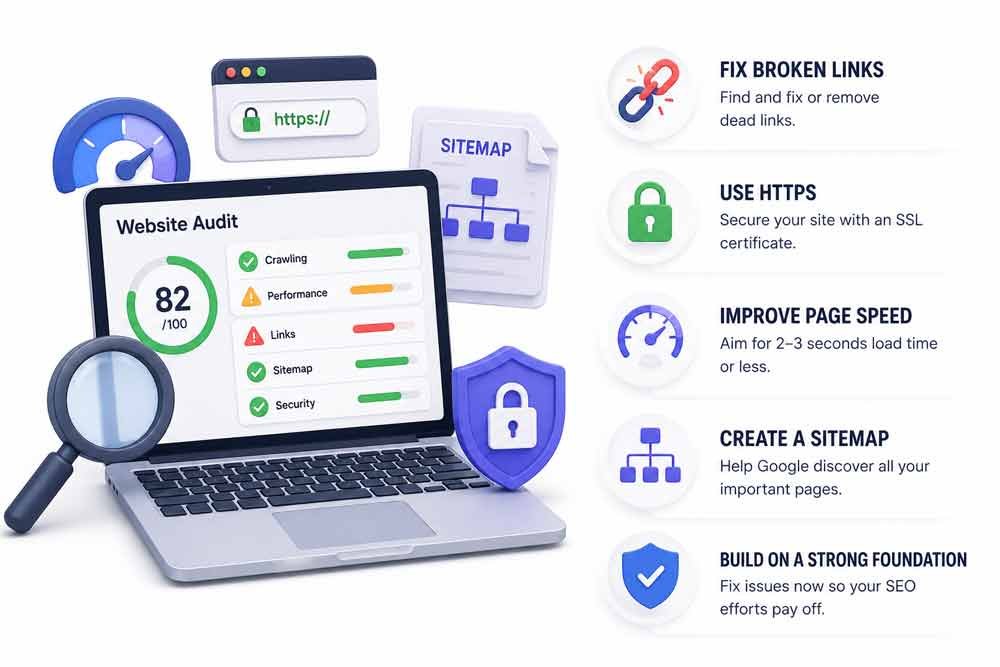
Before writing a single new word, find out what’s already broken. A website audit is the first step in any solid SEO strategy, and it’s the step most beginners skip entirely.
Think of it like a health check for your site. It shows you dead links, slow pages, security issues, and missing sitemaps, the hidden problems quietly holding your rankings back before you’ve even started publishing new content.
What to check first
Broken links. Dead links tell Google your site isn’t maintained. Find them and either fix or remove every one, tools like Ahrefs, Semrush, or the free Screaming Frog crawler will surface these quickly.
HTTPS. If your site still runs on HTTP, install an SSL certificate today. Browsers actively flag unsecured sites, and Google treats HTTPS as a baseline trust signal, not a bonus.
Page speed. Google considers roughly 2-3 seconds the practical upper limit for acceptable loading time before people start bouncing. Use GTmetrix or Google PageSpeed Insights to test yours and act on what it flags.
Missing sitemap. A sitemap is how Google discovers all your pages. Check whether yours exists by visiting yoursite.com/sitemap_index.xml in your browser. Nothing there? Create one with Rank Math, it takes about two minutes and generates automatically going forward.
Fix these first. There’s no point building new content on top of a foundation with cracks in it.
2. Build a Keyword List You Can Actually Win
This is the step where most beginners waste months of effort. They target the most popular keywords, get buried on page eight, and give up thinking SEO doesn’t work.
Here’s the reality: high search volume means high competition. A new or smaller site can’t outrank Ahrefs, Moz, or Search Engine Journal for a broad term like “SEO tips.” Not yet, and maybe not for years.
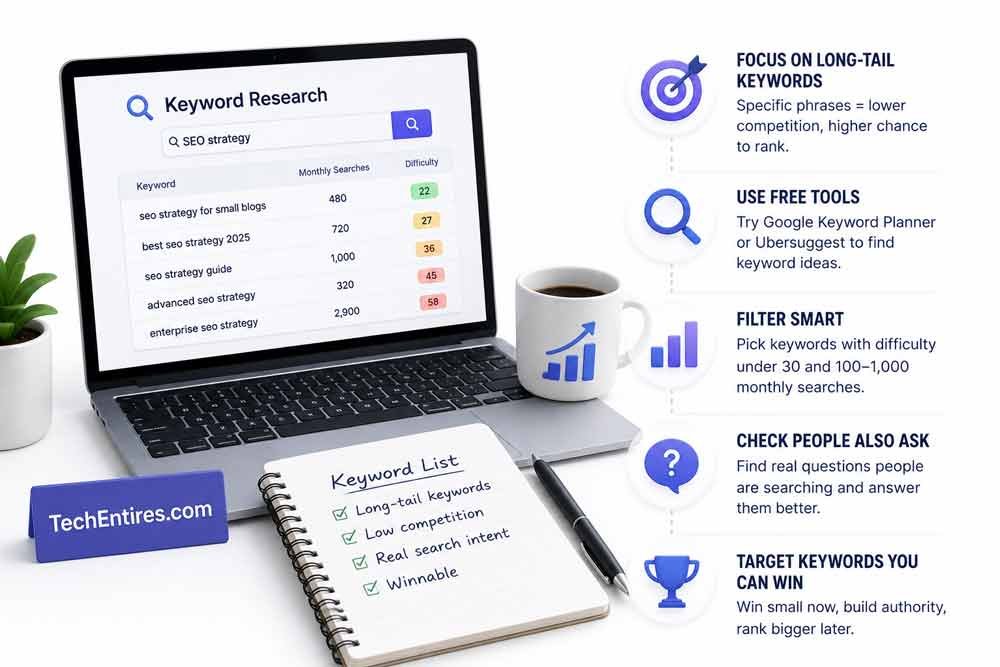
The smarter move is targeting long-tail keywords, specific, lower-competition phrases that real people are actively searching. “SEO tips” gets millions of searches and is nearly impossible to rank for as a new site. “SEO tips for small blogs” gets far fewer searches, but with dramatically less competition, which makes it genuinely winnable.
A simple process using free tools
Open Google Keyword Planner or a free tool like Ubersuggest. Type in a broad topic, say, “SEO strategy”, and look at the related suggestions. Filter for phrases with a difficulty score under 30 and monthly searches somewhere between 100 and 1,000. Those are realistic targets for a newer site.
Also check the “People Also Ask” box and the related searches at the bottom of Google’s results page. These are real questions real people are typing. Answer them clearly and you have a genuine shot at page one.
3. Study What’s Already Ranking
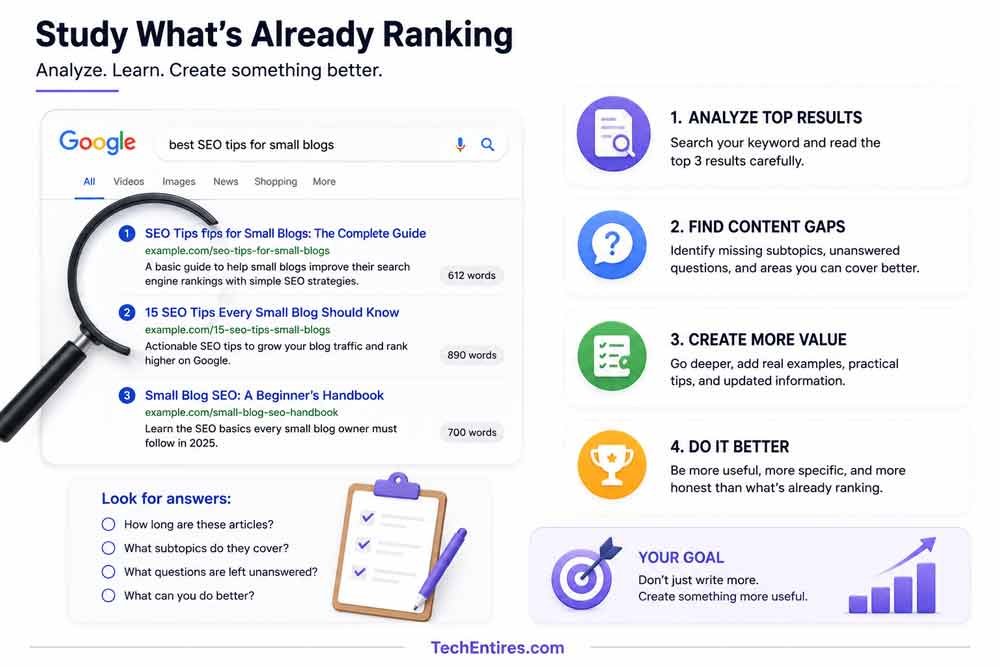
Found your keywords? Don’t write anything yet. Search them on Google first and actually read the top three results.
This isn’t about copying, it’s about understanding why those pages rank and what you can do better. Ask yourself: how long are these articles? What subtopics do they cover? What questions do they leave unanswered?
If the top result is a surface-level 600-word overview, write a genuinely practical 1,500-word guide instead. If every top result skips a specific question your readers would actually have, that gap is exactly where a smaller site can win. The goal isn’t to write more, it’s to create something more useful, more specific, and more honest than what’s currently ranking.
4. Write Content That People Actually Want to Read

Here’s an uncomfortable truth: most content that doesn’t rank deserves not to rank. It’s thin, generic, and just a slightly reworded version of everything else already on page one.
Answer the question fast. Don’t bury the answer in paragraph five. Put it near the top, Google rewards pages that satisfy search intent quickly, and so do real readers who are scanning rather than reading word for word.
Write like a human, not a robot. Use conversational language. Write the way you’d explain something to a friend sitting across from you. If a sentence sounds stiff or overly formal when you read it back out loud, rewrite it.
Cover the topic properly. Don’t pad length just to hit a word count, but don’t leave real gaps either. A genuinely good article covers what a beginner needs to know and gives someone with a bit more experience something worth digging into as well.
Avoid keyword stuffing. Use your primary keyword naturally in the title, the first paragraph, a few subheadings, and sprinkled through the body. If it sounds forced when read aloud, remove it or rephrase the sentence entirely.
Content optimization isn’t about tricking Google, it’s about being the most genuinely helpful result for the person actually searching.
5. On-Page SEO Tips You Can’t Afford to Skip

On-page SEO is everything you control directly on each page. Get these right on every article you publish, think of this as your technical checklist for content.
The five fundamentals
Title tag. The main headline shown in search results. Include your primary keyword and make it click-worthy, people decide in a split second whether to click or keep scrolling. Keep it under 60 characters so it doesn’t get cut off.
Meta description. The two-line summary under your title in Google. It doesn’t directly affect rankings, but it massively affects whether people actually click. Keep it under 160 characters, include your keyword, and give readers a real reason to care.
Header tags (H1, H2, H3). Your H1 is the article title. Use H2 for main sections and H3 for sub-points within those sections. This structure helps Google understand your content and makes the page dramatically easier for a human to skim.
URL slug. Short, clean, and keyword-focused. A short, direct URL beats a long, over-explained one every time, shorter URLs are easier to share and easier for Google to parse.
Internal links. Link to two or three related articles on your site from every post. This passes authority between pages, keeps visitors reading longer, and both of those things help your rankings over time.
Keyword optimization is just one piece of the puzzle, for the full picture, see our on-page SEO checklist, which covers title tags, headings, internal linking, and technical fixes together.
6. Add Images, Videos, and Compress Everything

Visual content does two things: it breaks up walls of text that cause people to leave early, and it gives Google more signals about what your page is actually about.
For every article, use at least two or three relevant images. Always compress them before uploading, large uncompressed images are one of the most common causes of slow page speed. TinyPNG or ShortPixel handle this well if you’re on WordPress.
Every image needs alt text, a short description that tells Google and visually impaired users what the image shows. Include your keyword naturally if it genuinely fits; don’t force it where it doesn’t belong.
If you have a relevant video, embed it. Pages with embedded video consistently hold visitors longer, and that extra time on page signals to Google that your content is worth reading, which helps your rankings indirectly.
7. Build Backlinks the Right Way

Backlinks remain one of the strongest ranking signals Google uses. A link from another site to yours is essentially a vote that says your content is worth reading, the more credible the source, the bigger the boost.
But here’s what beginners need to understand early: spammy links hurt you. Buying links, submitting to hundreds of random directories, or joining link schemes, Google has seen all of it, and it penalizes for it.
Backlink strategies that actually work
Broken link building. Find articles in your niche with broken outbound links pointing to dead pages. Reach out to the site owner, point out the broken link, and suggest your relevant content as a replacement. A free Chrome extension like Check My Links makes finding these fast.
Guest posting. Write a genuinely useful article for another site in your niche, including a contextual link back to your own content. Choose sites with real, engaged audiences, not just sites with an impressive-looking domain authority number and nothing else.
Competitor backlink research. Take a top-ranking URL for your target keyword and paste it into Ubersuggest or Ahrefs. It shows every site linking to that page. Those sites have already linked to content on this exact topic once, they may link to yours too if you reach out with something genuinely better.
Quality beats quantity here. A handful of links from relevant, trusted sites will do more for your rankings than hundreds of low-quality directory links ever could.
8. Technical SEO: The Stuff Running in the Background
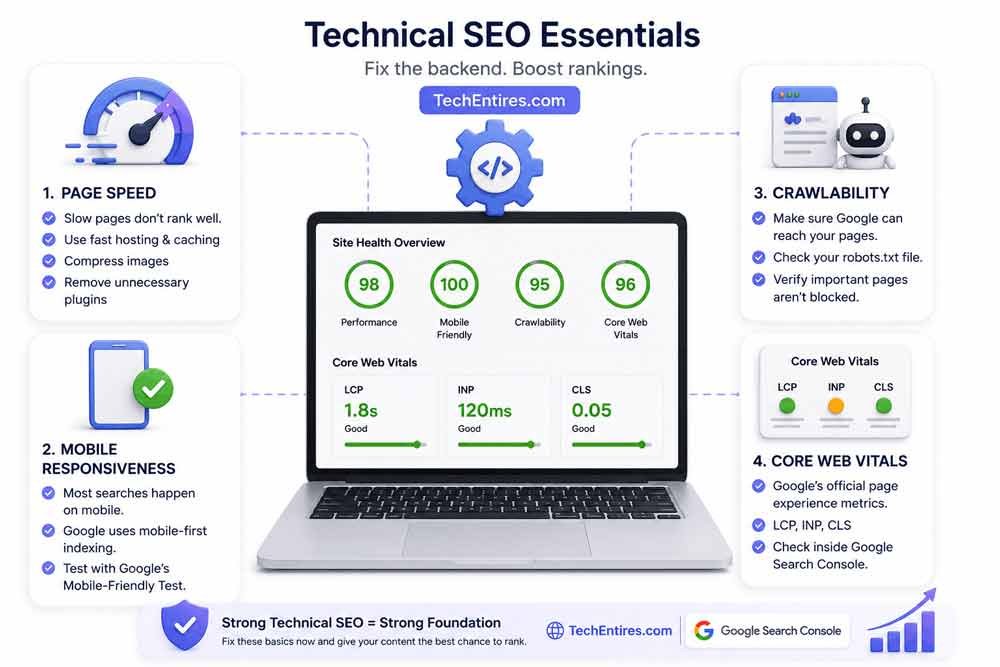
You don’t need to be a developer to handle basic technical SEO, but ignoring it entirely is like building a house on sand.
The essentials
Page speed. Already covered in the audit section, but it matters enough to repeat. Slow pages don’t rank well. Use fast hosting, enable caching, compress images, and cut unnecessary plugins.
Mobile responsiveness. The majority of searches now happen on mobile, and Google uses mobile-first indexing, meaning it judges your site based on how it performs on a phone, not a desktop. Run your site through Google’s Mobile-Friendly Test and act on what it tells you.
Crawlability. Make sure Google’s bots can actually reach your pages. Your robots.txt file controls what Google is allowed to crawl. Check it inside Google Search Console and confirm you haven’t accidentally blocked important pages.
Core Web Vitals. These are Google’s official page experience scores, loading speed (LCP), interactivity, and visual stability (CLS). Check yours directly in Google Search Console under the Core Web Vitals report.
9. Sort Your Sitemap and Robots.txt
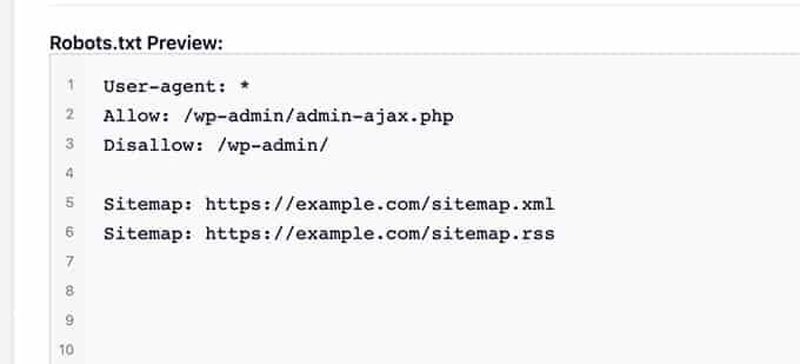
These two files work together to tell Google what to index and what to ignore.
Your sitemap lists every public page on your site. Submit it to Google Search Console so Google can find and index your content faster. Rank Math generates sitemaps automatically on WordPress, just submit the URL inside Search Console once it exists.
Your robots.txt file tells Google which pages not to crawl, admin pages, login pages, duplicate content. Be careful here: one wrong line can accidentally block your entire site from Google. If you’re unsure what a line does, leave it at the default settings rather than guessing.
Update your sitemap whenever you publish, delete, or redirect a page. Google rewards accuracy here more than people expect.
10. Local SEO (If You Serve a Specific Area)

If your business operates in a specific city or region, local SEO is one of the fastest wins available to you.
Set up your Google Business Profile, the information panel that appears when someone searches for your business or looks for services “near me.” Fill in every field: address, phone number, opening hours, photos, and a clear description.
Build local citations, mentions of your business name, address, and phone number on directories like Yelp, industry-specific listings, and local chambers of commerce. Consistency matters here: your NAP (Name, Address, Phone) needs to be identical across every listing.
Use location-based phrases naturally in your content. If you’re a digital marketing consultant in Austin, phrases like “digital marketing tips for Texas businesses” or “SEO help for small businesses in Austin” will help you appear in relevant local searches.
11. Schema Markup Gives Google Extra Context
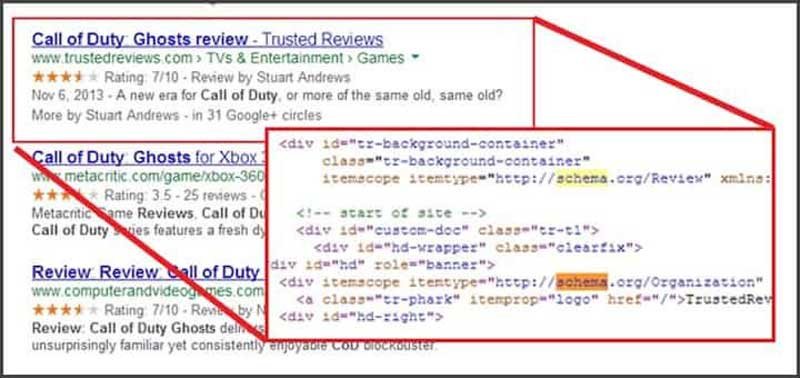
Schema markup is a small piece of code that helps Google understand your content more precisely. You don’t need to write it manually, Rank Math handles most of it automatically once configured.
For a blog, the most useful schema types are:
Article schema tells Google this is a published piece with a date and author, boosting its credibility signals.
FAQ schema marks up your FAQ sections so Google can display questions and answers directly in search results, giving your page more visibility without needing to rank any higher than it already does.
Breadcrumb schema shows the navigation path to your page in search results, which improves click-through rates by giving users more context before they click.
None of these are required to rank, but they make your result stand out on the page, and a result that stands out gets more clicks even from the exact same ranking position.
12. Track, Analyze, and Keep Updating
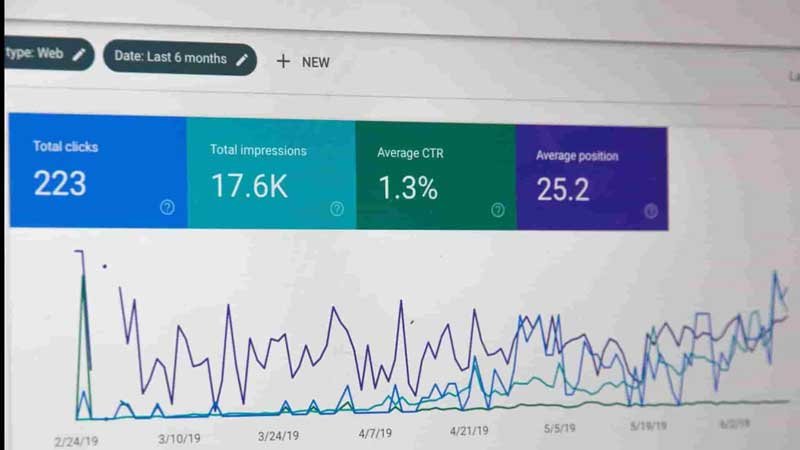
SEO isn’t a publish-and-forget job. Sites that consistently improve their rankings treat their content as living documents, not archived posts.
Set up Google Analytics and Google Search Console if you haven’t already, both are free, and both are essential. In Search Console, check your Performance report weekly.
It shows which keywords you’re appearing for, your average position, and your click-through rate. If a keyword is getting impressions but few clicks, your title or meta description needs work. If you’re ranking on page two for a good keyword, a focused content refresh might be enough to push you to page one.
In Analytics, watch your bounce rate and average time on page. If people land on your article and leave within seconds, the content isn’t delivering what the headline promised, fix that mismatch before doing anything else.
Every few months, revisit your older articles. Update statistics, fix broken links, add fresh information, and republish with an updated date. Google consistently favors refreshed, accurate content over stale articles, even when the original was well-written.
That’s how you grow organic traffic over the long term, not by constantly publishing new content, but by making what you already have genuinely better.
SEO Techniques Checklist for Beginners (2026)
- Website audit completed: broken links, HTTPS, page speed, sitemap
- Keyword list built around long-tail, winnable phrases, not head terms
- Top-ranking competitor content reviewed before writing
- Content answers the question early, written in a natural, human voice
- Title tag, meta description, headers, URL, and internal links all optimized
- Images compressed with descriptive alt text; video embedded where relevant
- Backlinks pursued through broken-link building, guest posts, and competitor research, not spam
- Core Web Vitals and mobile responsiveness checked in Search Console
- Sitemap and robots.txt verified and submitted to Search Console
- Google Business Profile complete, if serving a local area
- FAQ, Article, and Breadcrumb schema implemented via Rank Math
- Search Console and Analytics checked weekly; old content refreshed regularly
Common Mistakes That Keep Beginners Stuck
Targeting head terms with no realistic chance of ranking. A new site chasing “SEO tips” instead of a specific long-tail variant is setting itself up for months of invisible effort.
Skipping the audit and jumping straight to content. Broken links, missing HTTPS, and slow load times quietly cap how well even great content can perform.
Writing for search engines instead of people. Keyword-stuffed, robotic content gets skipped by readers and increasingly recognized as low-value by Google itself.
Chasing backlinks through shortcuts. Directory spam and bought links create more risk than reward, a handful of genuinely earned links outperforms hundreds of low-quality ones.
Publishing and never returning. Content that’s never refreshed slowly loses ground to competitors publishing more current information on the same topic.
A Real-World Scenario
A new blogger spent three months publishing twice a week, targeting broad terms like “SEO tips” and “how to rank on Google,” and saw almost no traffic to show for it. Every post was competing directly against Moz, Ahrefs, and Search Engine Journal, a fight a brand-new site was never going to win.
After switching strategy, running a proper audit, targeting specific long-tail keywords like “SEO tips for small blogs” and “on-page SEO checklist for beginners,” and adding FAQ schema to existing posts, several articles started appearing on page one within weeks, not months.
Nothing about the writing quality changed dramatically. The difference was fighting battles that were actually winnable instead of competing head-on with sites that had a decade-long head start.
Frequently Asked Questions
What are the best SEO techniques to boost organic traffic for beginners? Start with a full website audit, then build a keyword list around specific, long-tail phrases rather than broad head terms. Combine that with genuinely helpful content, solid on-page SEO, and backlinks earned through broken-link building and guest posting rather than shortcuts.
How long does it take to see results from SEO? Most sites start seeing meaningful movement within three to six months, though timelines vary based on competition and how consistently you’re publishing and refreshing content. SEO compounds, early effort often pays off more the longer a site has been actively maintained.
Do I need to hire an expert to do SEO, or can beginners do it themselves? Beginners can absolutely handle the fundamentals covered here, audits, keyword research, on-page optimization, and basic technical SEO. More advanced technical work or large-scale link building sometimes benefits from expert help, but it’s not required to get started and see real progress.
What’s the difference between on-page and technical SEO? On-page SEO covers what you control directly within your content, titles, headers, keywords, internal links. Technical SEO covers the underlying site infrastructure, page speed, mobile responsiveness, crawlability, and Core Web Vitals. Both matter, and neither fully compensates for weakness in the other.
How often should I update old blog posts for SEO? Every few months for your most important pages. Google consistently favors refreshed, accurate content over stale articles, and a focused update to an underperforming post often outperforms writing something brand new from scratch.
Is keyword stuffing still a problem in 2026? Yes. Keyword stuffing reads as robotic to both readers and Google’s current content-quality systems. Use your primary keyword naturally a handful of times throughout the piece, and prioritize clarity over repetition every time.
