If you’ve published a page and it’s still not ranking, the problem usually isn’t your writing. It’s on-page SEO, the technical and content signals on the page itself that tell Google exactly what it’s about and why it deserves a spot on page one.
Most on-page SEO checklists online are either outdated (built for keyword-stuffing tactics that stopped working years ago) or so long they’re impossible to actually use.
This one is different. It’s built around what’s actually working right now, in 2026, including how to handle AI Overviews, Core Web Vitals, and search intent, not just where to put your keyword.
By the end of this guide, you’ll have a complete, repeatable on-page SEO checklist you can run on every post you publish, whether it’s a blog article, a product page, or a landing page.
Why “checklist” specifically, and not just “on-page SEO”? Because that’s how people actually search for this. Broader terms like “on-page SEO” and “onpage SEO” pull in a flood of generic definition pages competing against massive, established SEO sites, a much harder climb for most sites.
“On-page SEO checklist” is the version people search for when they’re ready to actually do the work, not just read a definition, and it’s a genuinely achievable target if the content actually delivers a usable checklist instead of another wall of theory. That’s exactly what this guide is.
What Is On-Page SEO?
On-page SEO means optimizing the elements that live directly on your web page, your title tag, headings, content, URL, internal links, and images, so both search engines and readers immediately understand what the page is about and why it’s worth ranking.
It’s different from two other pillars of SEO you’ve probably heard of:
- Off-page SEO happens away from your website. Think backlinks, brand mentions, and social signals. Learn more about why link building still matters for SEO.
- Technical SEO covers the behind-the-scenes stuff, site speed, crawlability, XML sitemaps, and indexing. It overlaps with on-page SEO but focuses more on how search engines access your site rather than what’s on the page itself.
On-page SEO sits in the middle. You control every part of it directly, which makes it the fastest, most cost-effective way to improve your rankings, no outreach, no budget, no waiting on external factors.
Why On-Page SEO Still Matters in 2026
Some marketers assume on-page SEO is less important now that Google uses AI models like BERT and MUM to understand context. That’s not quite right. Google’s algorithms got better at understanding pages, but they still rely entirely on the signals you put on the page to know what it’s about.
A few things have actually made on-page SEO more important recently, not less:
- AI Overviews pull directly from well-structured pages. Google’s AI-generated answers favor content with clear headings, direct answers, and logical structure, exactly what good on-page SEO produces. See how SEO and Google’s AI Overviews interact.
- Search intent matching matters more than keyword density. Google’s NLP models can tell the difference between a page that answers a question and a page that just repeats a keyword. Thin, keyword-stuffed content gets buried.
- E-E-A-T (Experience, Expertise, Authoritativeness, Trustworthiness) is now baked into how content gets evaluated, which means author bios, original insights, and clear sourcing carry real weight.
In short: on-page SEO hasn’t gotten less important. It’s gotten more precise.
The Complete On-Page SEO Checklist
Here’s the full checklist, broken into sections so you can work through it in order, from keyword research all the way to publishing.
1. Start With Keyword Research and Search Intent
Before you write a single word, know exactly what your reader is trying to accomplish. Search intent generally falls into four buckets:
- Informational: the reader wants to learn something (“what is on-page SEO”)
- Navigational: the reader wants a specific site or page (“Semrush login”)
- Commercial investigation: the reader is comparing options (“best SEO tools 2026”)
- Transactional: the reader is ready to buy or take action (“hire an SEO specialist”)
Look at the top 10 results for your target keyword before you write anything. If every result is a listicle, Google has decided that format wins for that query, writing a single-product review instead won’t rank, no matter how well-optimized it is.
Checklist:
☐ Identify one primary keyword per page
☐ Confirm the search intent by checking the current top-ranking pages
☐ Build a shortlist of secondary and related keywords to weave in naturally (not force in)
A quick note on “LSI keywords”: you’ll still see this term everywhere in SEO content. Technically, Google has confirmed it doesn’t use the original Latent Semantic Indexing model. But the practical habit behind the term still works, adding words and phrases that are naturally related to your topic helps Google’s language models understand context and depth.
The easiest way to find them: type your primary keyword into Google, scroll to “related searches” at the bottom, and check the “People Also Ask” box. Those are the exact terms real searchers use alongside your topic, and they’re free to pull straight from the search results page.
2. Optimize Your Title Tag
Your title tag is the single most important on-page element. It’s the first thing both Google and your reader see.
Best practices for 2026:
- Put your primary keyword in the first half of the title, Google weights earlier terms more heavily
- Keep it under 60 characters (roughly 55–60) so it doesn’t get truncated on mobile or desktop
- Add a modifier like “2026,” “Complete Guide,” or “Checklist”, these consistently improve click-through rate
- Never duplicate title tags across pages; it confuses Google about which page should rank
- Make sure the title accurately reflects the content, a misleading title spikes bounce rate, and Google notices
Example:
Weak: *SEO Tips*
Strong: *On-Page SEO Checklist 2026: 15 Steps to Rank Higher*
3. Write a Meta Description That Earns the Click
Meta descriptions aren’t a direct ranking factor, but they heavily influence click-through rate, which absolutely does affect rankings over time.
Checklist:
☐ Keep it between 140–160 characters
☐ Include your primary keyword naturally (Google often bolds matching terms in search results)
☐ Write it like an ad, state the benefit, not just the topic
☐ Add a clear reason to click (“free checklist,” “step-by-step,” “updated for 2026”)
4. Use a Clean, Descriptive URL Structure
Short, readable URLs perform better, for both users and search engines.
Checklist:
☐ Include your primary keyword in the URL slug
☐ Avoid dates, numbers, and random IDs in the URL
☐ Use hyphens to separate words, never underscores
☐ Keep URLs short, 3–5 words is ideal
Example:
Weak: techentires.com/post?id=48291&cat=seo
Strong: techentires.com/on-page-seo-checklist
5. Structure Your Content With Proper Headings
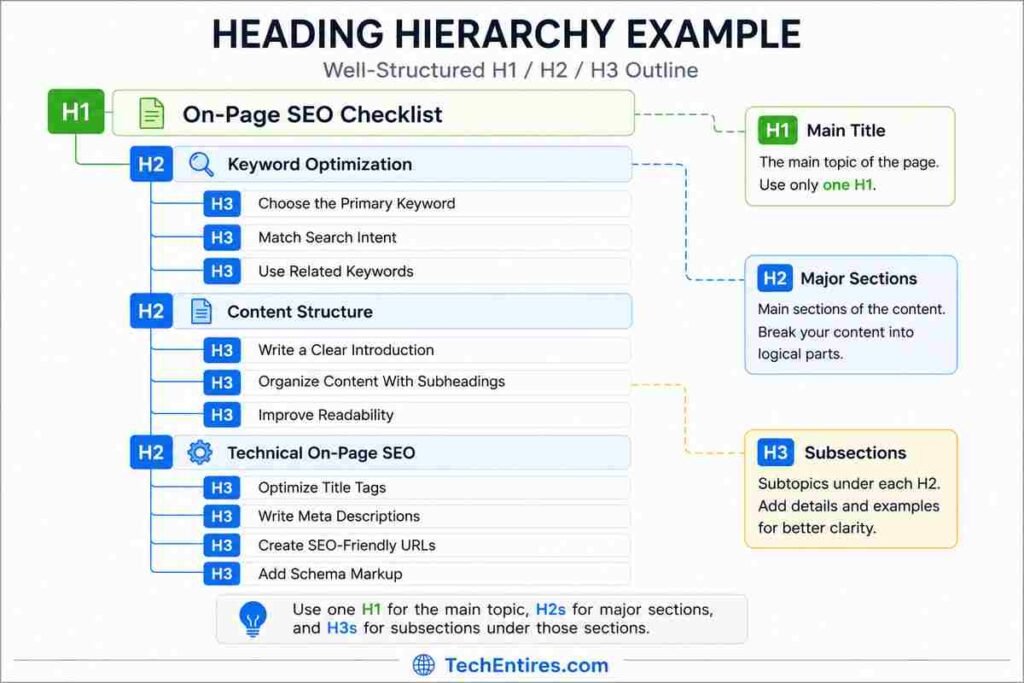
Search engines, and readers, scan your page’s structure before they read a word of body text. A clear H1 → H2 → H3 hierarchy tells Google exactly how your content is organized.
Checklist:
☐ Use exactly one H1 per page (usually your title)
☐ Break the body into H2 sections that mirror what a reader would search for
☐ Use H3s for sub-points inside an H2 section
☐ Include your primary or a related keyword in at least one H2, but don’t force it into every heading
6. Write Content That Actually Matches Search Intent
This is where most on-page SEO checklists stop short, they focus on structure and ignore the thing structure is supposed to support: genuinely useful content.
Checklist:
☐ Answer the core question in the first 100 words, don’t bury the lede
☐ Cover the topic more completely than the current top-ranking pages
☐ Use plain, direct language, robotic, over-optimized writing is actively penalized by Google’s helpful content systems
☐ Add original insight, data, or examples the top results don’t have
☐ Break up long paragraphs, 2–3 sentences per paragraph keeps readers scrolling
☐ Naturally include related and semantic keywords (see the section below on LSI/related terms), don’t repeat your primary keyword mechanically
7. Build a Smart Internal Linking Structure
Internal links do two jobs: they help Google discover and understand your other pages, and they pass “link equity” from strong pages to newer ones.
Best practices:
- Use descriptive anchor text (“on-page SEO checklist” instead of “click here”), it tells Google exactly what the linked page covers
- Link from your highest-traffic pages to pages you want to rank
- Aim for roughly 3–5 internal links per 1,000 words, more than that dilutes the value of each link
- Fix orphan pages (pages with zero internal links pointing to them), they rarely rank well
The most effective structure in 2026 is still the pillar-and-cluster model: one comprehensive pillar page on a broad topic (like SEO techniques to boost organic traffic), linked to and from several detailed cluster pages like this one.
Checklist:
☐ Link to at least 3–5 relevant internal pages
☐ Use descriptive, keyword-relevant anchor text
☐ Link back to this page from related posts once it’s published
☐ Check for and fix any orphan pages on your site
8. Optimize Every Image
Images affect both user experience and page speed, and page speed is a confirmed ranking factor.
Checklist:
☐ Compress every image before uploading (WebP format loads faster than JPEG or PNG)
☐ Write descriptive alt text for every image, it’s confirmed to help Google Image Search, and it’s essential for accessibility
☐ Use descriptive file names before uploading (on-page-seo-checklist.webp, not IMG_4821.jpg)
☐ Add width and height attributes so the browser reserves space and avoids layout shift
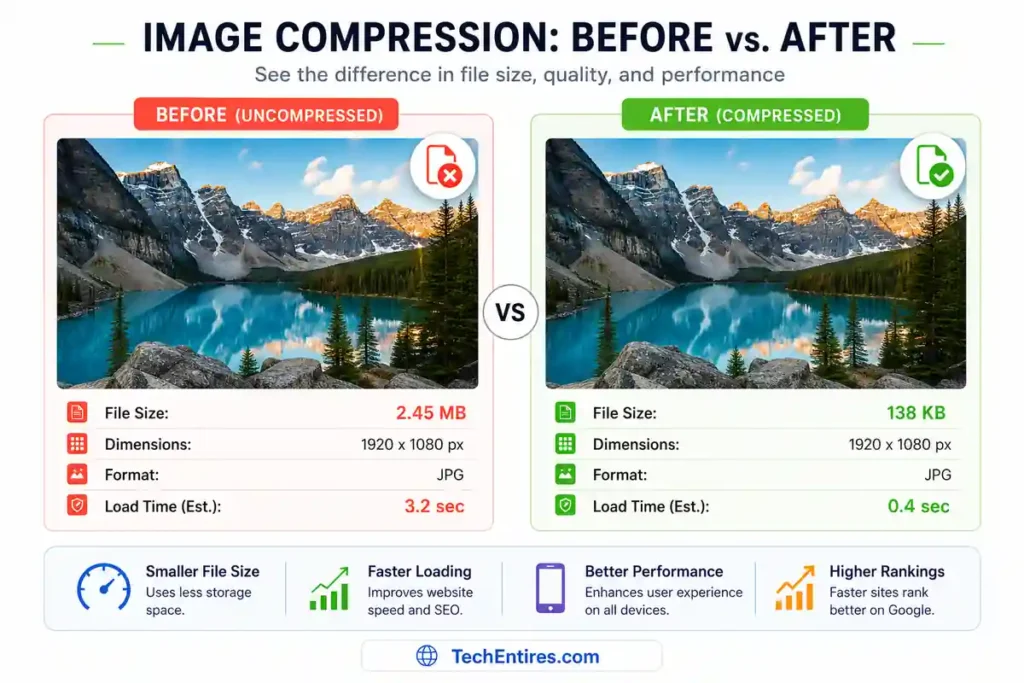
For a full breakdown of this step, see our guide on how to optimize images for SEO.
9. Add Structured Data (Schema Markup)
Schema markup doesn’t directly boost rankings, but it helps Google understand your content faster and can unlock rich results, star ratings, FAQ dropdowns, how-to steps, that significantly increase click-through rate.
Checklist:
☐ Add Article schema to blog posts
☐ Add FAQ schema if your page includes a Q&A section (like the one below)
☐ Add Product schema to product pages, including price and availability
☐ Validate your schema with Google’s Rich Results Test before publishing
10. Nail Page Speed and Core Web Vitals
Google’s Core Web Vitals are an official ranking signal, and slow pages lose readers before they ever get to your content.
The three metrics that matter most:
- Largest Contentful Paint (LCP): how fast your main content loads, aim for under 2.5 seconds
- Interaction to Next Paint (INP): how quickly your page responds to clicks and taps
- Cumulative Layout Shift (CLS): how much your page jumps around as it loads, aim for a score under 0.1
Checklist:
☐ Compress and lazy-load images
☐ Minify CSS and JavaScript
☐ Use a caching plugin if you’re on WordPress
☐ Test your page with Google PageSpeed Insights and fix the top-flagged issues
If you’re running WordPress, our guide on how to optimize CSS to maximize website performance walks through this in more depth.
11. Confirm Mobile-Friendliness
More than half of all searches happen on mobile, and Google indexes the mobile version of your page by default.
Checklist:
☐ Test your page with Google’s Mobile-Friendly Test
☐ Make sure text is readable without zooming
☐ Make sure buttons and links are large enough to tap easily
☐ Check that pop-ups don’t block content on mobile devices
12. Strengthen E-E-A-T Signals
Google’s quality systems increasingly reward pages that demonstrate real experience and expertise, not just information.
Checklist:
☐ Include an author byline with relevant credentials
☐ Link to credible external sources when citing statistics or claims
☐ Add original examples, screenshots, or data where possible
☐ Keep an “last updated” date visible so readers and Google know the content is current
13. Keep Content Fresh
Search engines favor content that’s actively maintained over content that was published once and forgotten.
Checklist:
☐ Review your top pages every 6–12 months
☐ Update statistics, screenshots, and examples that have gone stale
☐ Update the published or “last modified” date after a meaningful revision
☐ Check for broken internal or external links and fix them
For a deeper walkthrough of this process, see our complete guide to rewriting old blog posts.
On-Page SEO for Ecommerce Pages
Product and category pages need a few extra checks beyond the standard checklist above:
Checklist:
☐ Write unique product descriptions, never copy manufacturer descriptions, which creates duplicate content across the web
☐ Add Product schema with price, availability, and review data
☐ Include size, material, or specification details that match how shoppers actually search
☐ Optimize category page titles for commercial-intent keywords (“buy,” “best,” “cheap”)
☐ Add customer reviews, they’re a strong trust signal and often generate long-tail keyword matches naturally
If you’re building or refining an online store, our guide on how to build an impressive online store covers the platform and setup side in detail.
Tools to Audit Your On-Page SEO
You don’t need an expensive subscription to run through this checklist properly. A handful of free tools cover almost everything:
- Google Search Console: shows exactly which pages and queries are gaining or losing clicks, and flags mobile usability and indexing issues for free
- Google PageSpeed Insights: tests Core Web Vitals and gives a prioritized list of fixes for each page
- Google’s Rich Results Test: confirms your schema markup is valid and shows which rich results it qualifies for
- Google’s Mobile-Friendly Test: a fast pass/fail check for mobile usability
- A free browser extension like Detailed SEO Extension: shows title length, heading structure, and meta tags at a glance while you browse your own site
If you’re just getting started and want a fuller toolkit, our guide on essential SEO tools for beginners rounds up the best free options in one place.
And once your on-page work is solid, our breakdown of competitor keyword analysis tools is the natural next step, it helps you find the gaps your competitors haven’t optimized for yet.
Common On-Page SEO Mistakes to Avoid
Even experienced site owners fall into these traps:
- Keyword stuffing. Repeating your primary keyword unnaturally doesn’t help rankings anymore, it hurts readability and can trigger quality filters.
- Duplicate title tags or meta descriptions across multiple pages. This confuses Google about which page should rank for a given query.
- Ignoring search intent. A perfectly optimized page still won’t rank if it’s the wrong content format for what searchers actually want.
- Skipping alt text. It’s a two-second fix with real accessibility and Image Search benefits.
- Publishing and forgetting. Pages that never get updated slowly lose rankings to fresher competitors.
- Weak internal linking. New content that isn’t linked from anywhere else on your site can take months longer to get indexed and ranked.
- Writing for search engines instead of people. Robotic, over-optimized copy is easy to spot, for readers and for Google’s helpful content systems alike. If a sentence reads awkwardly just to fit a keyword in, rewrite it.
- Treating on-page SEO as a one-time task. The pages that hold their rankings longest are the ones their owners revisit, not the ones they publish and forget.
Quick-Reference On-Page SEO Checklist
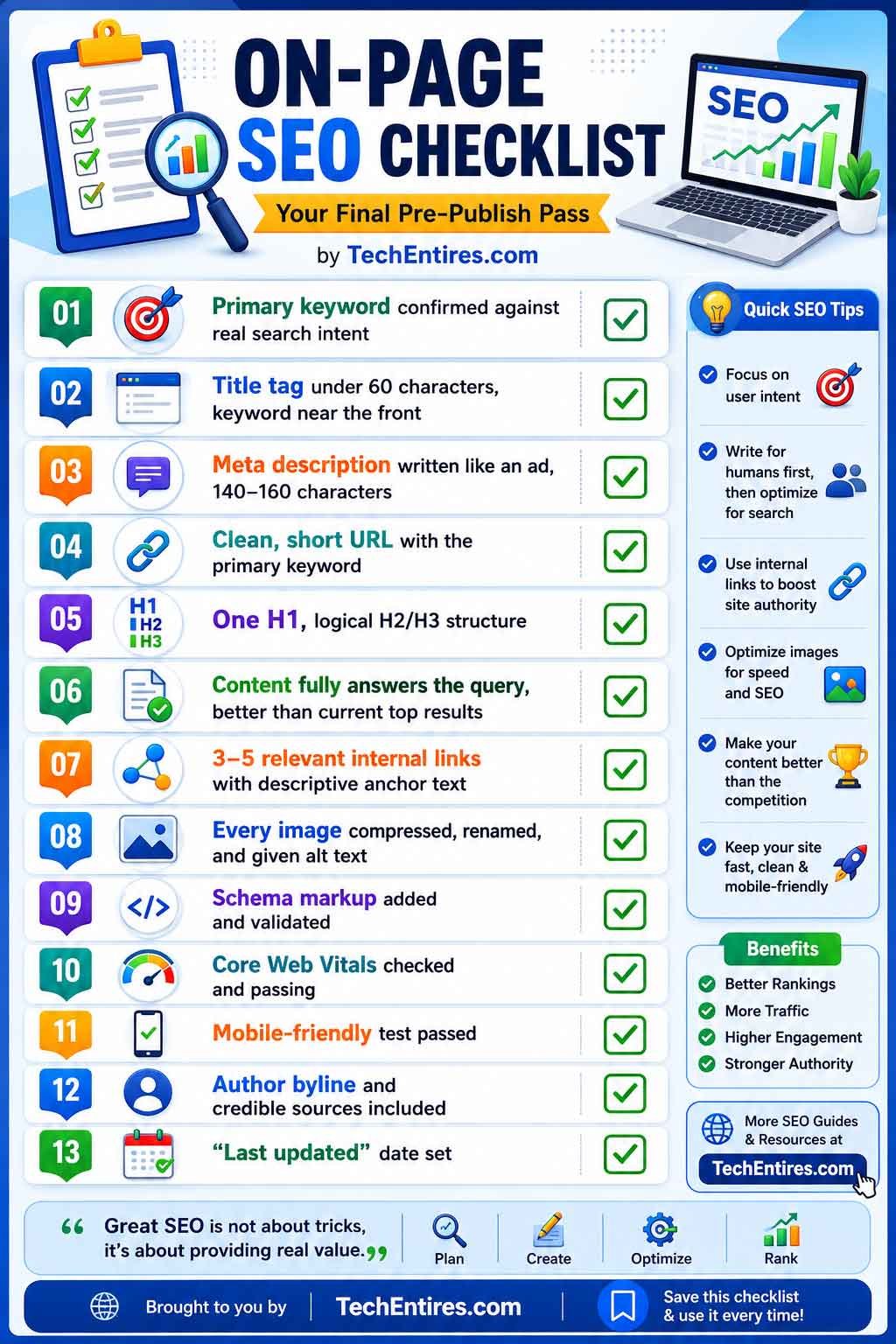
Use this as your final pre-publish pass:
☐ Primary keyword confirmed against real search intent
☐ Title tag under 60 characters, keyword near the front
☐ Meta description written like an ad, 140–160 characters
☐ Clean, short URL with the primary keyword
☐ One H1, logical H2/H3 structure
☐ Content fully answers the query, better than current top results
☐ 3–5 relevant internal links with descriptive anchor text
☐ Every image compressed, renamed, and given alt text
☐ Schema markup added and validated
☐ Core Web Vitals checked and passing
☐ Mobile-friendly test passed
☐ Author byline and credible sources included
☐ “Last updated” date set
Frequently Asked Questions
What is the difference between on-page and off-page SEO?
On-page SEO covers everything you control directly on your website, content, titles, headings, internal links, and images. Off-page SEO covers signals that happen outside your website, mainly backlinks and brand mentions. Both work together, but on-page SEO is where you have full control and can see results fastest.
How long does on-page SEO take to show results?
Most sites start seeing movement within 4–8 weeks of a well-executed on-page SEO update, though competitive keywords can take longer. Fixing technical issues like Core Web Vitals or broken internal links often shows the fastest improvement.
Do I need to redo on-page SEO for old blog posts?
Yes. Search engines favor actively maintained content. Revisiting your top-performing older posts every 6–12 months to update information, fix links, and improve structure is one of the highest-ROI SEO activities you can do.
Does keyword density still matter in 2026?
Not in the way it used to. There’s no ideal percentage to hit. Focus on covering the topic thoroughly and using your primary and related keywords naturally, rather than repeating them a set number of times.
What’s the single highest-impact on-page SEO fix?
For most sites, it’s title tag optimization combined with genuinely matching search intent. A page with a clear, keyword-relevant title that actually delivers what the searcher wants will consistently outperform a technically flawless page that misses the intent.
Can on-page SEO alone get my page to rank #1?
For low-competition, long-tail keywords, yes, often on-page SEO alone is enough. For competitive head terms, you’ll typically also need backlinks and domain authority. Learn what domain authority actually means and how it factors in.
Is on-page SEO different for a new website vs. an established one?
The core checklist stays the same, but priorities shift. New sites should focus hardest on search intent match and internal linking, since they don’t yet have the domain authority to win on competitive terms, long-tail, low-competition keywords are the faster path to early traffic.
Established sites get more value from revisiting and updating older pages, since fresh content on an already-trusted domain tends to climb faster than brand-new pages.
Final Thoughts
On-page SEO isn’t a one-time task, it’s a repeatable process you run on every page you publish, and revisit on every page you’ve already published.
The checklist above covers every element that actually moves the needle in 2026, from the basics like title tags and headings to the details that separate a page that ranks from one that doesn’t, like schema markup, Core Web Vitals, and E-E-A-T signals.
Running an online store? See our dedicated ecommerce SEO checklist for the product page, category page, and schema steps that apply specifically to stores.
Bookmark this page, run through the checklist on your next post, and come back to it every time you publish. That consistency compounds, and it’s the real difference between a site that slowly climbs the rankings and one that stays stuck on page two.
