
Great products don’t sell themselves if nobody can find them. Every year, millions of new online stores launch, and most of them make the same mistake: they pour their budget into design and inventory, then treat SEO as an afterthought.
Meanwhile, their competitors quietly capture the organic traffic that would have been free.
This checklist covers exactly what it takes to fix that, from keyword mapping and category page structure to the schema markup and AI-search visibility that decide whether Google (and increasingly, AI shopping assistants) recommend your store or skip it entirely.
Why “checklist” and not just “ecommerce SEO”? Because a broad term like “ecommerce SEO” pulls in a flood of definition-style content competing against Shopify, BigCommerce, Semrush, and Google’s own developer docs, some of the strongest domains on the internet.
A checklist is what people search for when they’re ready to actually implement changes, and it’s a genuinely achievable target for a growing store, provided the content actually delivers a usable, complete checklist instead of another generic overview. That’s what this one is.
What Is Ecommerce SEO?
Ecommerce SEO is the process of optimizing an online store so it ranks higher in search results, earns free organic traffic, and converts that traffic into sales, without paying for every click.
It shares the same foundation as on-page SEO for any website titles, headings, content quality, internal links, but it comes with challenges regular blogs and business sites rarely face:
- Large catalogs. A store with 1,000 products can generate hundreds of thousands of URLs once you factor in filters and variations.
- Duplicate content risk. Manufacturer-supplied product descriptions get copy-pasted across dozens of competing stores, and Google struggles to know which version to rank.
- Complex site structure. Category hierarchies, faceted navigation, and pagination all need to be planned so search engines can actually crawl and understand them.
- Highly competitive, high-intent keywords. Shoppers searching “buy running shoes” are ready to spend money, which means every competitor is fighting for that same click.
The fundamentals of SEO don’t change, but the scale and the page types do, and that’s exactly what this checklist is built around.
Why Ecommerce SEO Matters More in 2026
Two shifts have made ecommerce SEO more important, not less, over the past year:
- AI Overviews now answer a large share of shopping research before a shopper ever clicks a link. When someone asks an AI assistant “what’s the best budget running shoe,” the brands that get mentioned are the ones with clean structured data, quotable content, and strong topical authority, not just the ones with the biggest ad budget. See how SEO and Google’s AI Overviews interact.
- Google Merchant Center and free product listings now surface across Search, the Shopping tab, and AI-driven results. A store with an accurate, well-structured product feed gets far more visibility than one relying on organic blue links alone.
In short: an ecommerce SEO checklist isn’t optional groundwork anymore. It’s the difference between being the store Google (and AI search) recommends, and being the store nobody finds.
The Complete Ecommerce SEO Checklist
1. Map Keywords to the Right Page Type
Ecommerce keyword research isn’t just about finding high-volume terms, it’s about matching each keyword to the right page on your site.
Checklist:
☐ Map broad, category-level keywords (“running shoes”) to category pages
☐ Map specific, product-level keywords (“Nike Pegasus 41 men’s”) to individual product pages
☐ Map comparison and research keywords (“best running shoes for flat feet”) to blog or buying-guide content
☐ Cover all three search intents, informational, commercial investigation, and transactional, across your site, not just transactional
☐ Target long-tail keywords first on newer stores; a well-optimized category page for “healthiest dog food for small dogs” often also ranks for “healthiest dog food,” “dog food for small dogs,” and similar variations without extra work
2. Build a Clean Site Structure
Search engines need to find and understand every important page quickly. A messy structure buries your best pages and wastes crawl budget on pages that don’t matter.
Checklist:
☐ Keep every important page reachable within 3 clicks from the homepage
☐ Use breadcrumbs on every category and product page, with schema markup attached
☐ Organize categories in a logical hierarchy (Home > Shoes > Running Shoes > Men’s Running Shoes)
☐ Fix orphan pages, products or categories with zero internal links pointing to them rarely get crawled, let alone ranked
3. Optimize Category Pages
Category pages are your highest-leverage SEO asset in ecommerce, they typically target your highest-volume keywords and can rank for dozens of related long-tail variations at once.
Checklist:
☐ Write unique, keyword-relevant category descriptions, don’t leave the page as a bare product grid with no text
☐ Include your primary keyword in the title tag, H1, and meta description
☐ Add internal links to related categories and top-selling products within the page
☐ Use filters (size, color, price) that don’t generate indexable duplicate URLs, more on this below
4. Optimize Every Product Page
Product pages convert traffic into revenue, so they need to satisfy both search engines and buyers.
Checklist:
☐ Write a unique product description for every product, never copy the manufacturer’s text, which creates duplicate content across the web
☐ Include your primary keyword in the title tag, meta description, and H1
☐ Add descriptive alt text to every product image
☐ Include size, material, and specification details that match how shoppers actually search
☐ Add customer reviews, they’re a strong trust signal and often generate long-tail keyword matches naturally through customer language
5. Solve Duplicate Content and Faceted Navigation
This is the technical challenge unique to ecommerce, and it’s the one most checklists gloss over. Faceted navigation, filters for size, color, price, material, is a primary source of what’s sometimes called the “combinatorial explosion” problem: a store with 1,000 products can inadvertently generate a million low-value filtered URLs.
Here’s why that matters: every one of those filtered URLs competes for the same crawl budget as your actual money pages. Google allocates a limited amount of attention to each site, and if most of it gets spent crawling `?color=blue&size=medium&sort=price-asc` variations of the same category page, your genuinely important pages get crawled less often and take longer to rank.
Checklist:
☐ Set canonical tags on filtered/faceted URLs pointing back to the main category page
☐ Block low-value filter combinations from being crawled and indexed via robots.txt or meta robots tags
☐ Use a leaner “index budget” mindset, a smaller number of high-quality indexed pages consistently outperforms a bloated index full of thin, near-duplicate URLs
☐ Regularly audit for pages with zero traffic over the past 12 months and consider pruning or consolidating them
☐ Keep a small number of genuinely useful filter combinations indexable (like “blue running shoes” if it has real, distinct search demand) rather than blocking every filter indiscriminately
6. Handle Out-of-Stock and Discontinued Products Correctly
How you handle inventory changes has a direct, measurable SEO impact, and it’s one of the most commonly mishandled parts of ecommerce SEO.
Checklist:
☐ If a product is permanently discontinued, return a proper 404 or 410 status
☐ If a product is temporarily out of stock, keep the page live (200 status) and show a “similar items” or “recommended products” section so the page still offers crawlable value
☐ Never leave a live page showing “out of stock” with no alternative for months, it wastes the page’s accumulated rankings and frustrates visitors
7. Add Structured Data (Schema Markup)
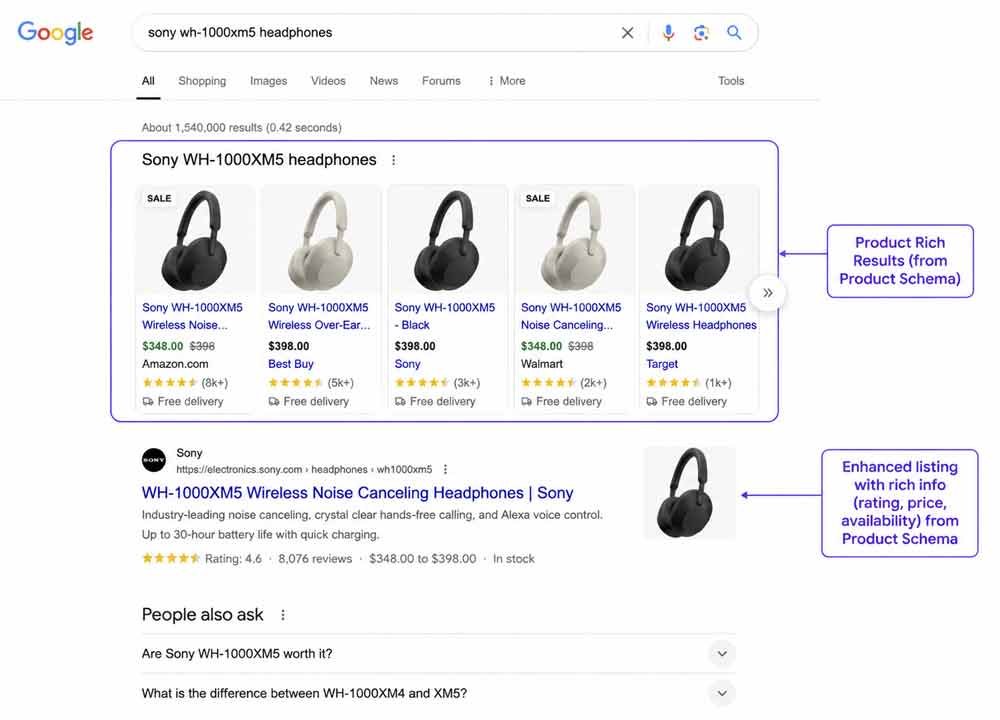
Schema is close to essential for competitive product rankings in 2026. It doesn’t just improve how your listings look in search, it feeds the structured data that AI shopping engines rely on to decide what to recommend.
Checklist:
☐ Add Product schema to every product page (name, image, description)
☐ Add Offer schema with accurate price and availability
☐ Add AggregateRating schema if you display reviews
☐ Add BreadcrumbList schema to reflect your site’s category hierarchy
☐ Add FAQPage schema to product or category pages that answer common buyer questions
☐ Validate everything with Google’s Rich Results Test before publishing
8. Nail Core Web Vitals and Mobile Performance
Slow, clunky mobile experiences cost ecommerce sites sales directly, not just rankings, a shopper who abandons a slow checkout doesn’t come back to try again later.
Checklist:
☐ Compress and lazy-load product images
☐ Test every key page with Google PageSpeed Insights and fix the top-flagged issues
☐ Verify high-value pages using the Googlebot Smartphone user agent, not just desktop, mobile-first indexing has been standard for years, but many audits still miss this
☐ Make sure hamburger-menu navigation doesn’t hide your site structure from crawlers, if the menu content isn’t in the page’s HTML until clicked, it can be invisible to search engines
☐ Simplify checkout forms and make sure buttons are large enough to tap easily on mobile
For a deeper walkthrough of the performance side, see our guide on optimizing CSS to maximize website performance.
9. Build Smart Internal Linking
Internal links help Google discover new products faster and pass ranking authority from your strongest pages to newer ones.
Checklist:
☐ Link from high-traffic category pages to your best-converting products
☐ Use descriptive anchor text (“men’s running shoes” instead of “shop now”)
☐ Connect related products and blog content with clear, descriptive links
☐ Aim for 3–5 internal links per 1,000 words of content on blog and guide pages
Our guide on interlinking blog posts covers the underlying technique in more depth if you’re building this out in WordPress.
10. Build Content That Earns Links and Authority
Product and category pages alone rarely earn backlinks. The content that does is buying guides, comparison articles, and original data, the same content that builds the topical authority AI Overviews cite.
Checklist:
☐ Publish buying guides for your main product categories (“How to Choose Running Shoes for Flat Feet”)
☐ Publish comparison content (“Leather vs. Synthetic Jackets: Which Should You Buy”)
☐ Link these guides back to the relevant category and product pages
☐ Update guides regularly, stale buying advice loses trust and rankings over time
11. Connect Your Product Feed to Google Merchant Center
This is the step most ecommerce SEO checklists skip entirely, and it’s increasingly important.
Checklist:
☐ Set up and verify Google Merchant Center for your store
☐ Keep your product feed accurate, pricing, availability, and images must match your live site
☐ Enable free product listings, which can surface across Search, the Shopping tab, and AI-driven results
☐ Review feed errors regularly; a broken feed silently loses you visibility without any obvious warning sign
12. Optimize for AI Search (GEO)
Traditional SEO focuses on ranking blue links. That’s no longer enough on its own, a growing share of product research now happens inside AI assistants before a shopper ever visits a search engine results page.
This shift has its own name in the industry, generative engine optimization, or answer engine optimization, but it isn’t a separate discipline you bolt on afterward.
It’s built directly on top of everything above: clean structured data, quotable content, and genuine topical authority are exactly what both traditional search rankings and AI citations reward.
Checklist:
☐ Make sure product data, pricing, and specifications are accurate and consistently structured across your site
☐ Write content that directly and clearly answers common buyer questions, quotable, specific answers get cited more often than vague marketing copy
☐ Strengthen entity authority through consistent branding, reviews, and mentions across the web
☐ Treat structured data (see step 7) as core infrastructure, not an optional extra, it’s what AI systems actually read
Choosing a Platform: A Quick Note
If you’re still deciding where to build your store, the platform does have a real, if secondary, SEO impact. Shopify tends to win on Core Web Vitals, speed, and mobile performance out of the box, thanks to managed infrastructure.
WordPress/WooCommerce gives up some of that convenience but offers more technical control, custom URL structures, deeper schema flexibility, and a more mature blogging engine for content-driven strategies.
For most stores, the platform isn’t the limiting factor, how thoroughly you work through the rest of this checklist is. If you’re earlier in the process, our guide on building an impressive online store covers the setup decisions in more detail.
Tools to Audit Your Ecommerce SEO
You don’t need an enterprise SEO subscription to work through this checklist. A handful of tools cover almost everything:
- Google Search Console: free, and shows exactly which product and category pages are gaining or losing clicks, plus mobile usability and indexing issues
- Google Merchant Center: surfaces feed errors that silently cost you visibility in Shopping and AI-driven results
- Google’s Rich Results Test: confirms your Product, Offer, and BreadcrumbList schema is valid before it goes live
- Google PageSpeed Insights: tests Core Web Vitals per page and gives a prioritized fix list
- Screaming Frog (free up to 500 URLs): crawls your site the way Google does, and is the fastest way to spot orphan pages and faceted-navigation bloat
If you’re just building your SEO toolkit, our roundup of essential SEO tools for beginners covers the fundamentals, and our guide to competitor keyword analysis tools is the natural next step once your own store’s technical foundation is solid.
Common Ecommerce SEO Mistakes to Avoid
- Copying manufacturer product descriptions. This is the single most common ecommerce SEO mistake, it creates duplicate content across potentially hundreds of competing stores.
- Leaving faceted navigation unmanaged. Uncontrolled filter URLs quietly bloat your index with thin, near-duplicate pages that dilute your site’s overall quality signal.
- Ignoring out-of-stock pages. Deleting a page instead of properly handling it (or leaving it live and abandoned) wastes rankings that took months to build.
- Skipping schema markup. In 2026, this is close to essential for competitive product rankings, skipping it is leaving visibility on the table for free.
- Treating SEO as a launch task instead of an ongoing process. Google launched multiple core algorithm updates in the past year alone; a store that sets up SEO once and never revisits it falls behind fast.
- Optimizing only for transactional keywords. Skipping informational and comparison content means missing shoppers earlier in their research, before they’re ready to buy.
- Neglecting reviews. Stores that make it hard to leave or find reviews lose both a trust signal and a steady stream of long-tail keyword matches that come from customers’ own language.
- Rebuilding the site without redirect planning. A platform migration or redesign that doesn’t 301-redirect old URLs to their new equivalents can wipe out years of accumulated rankings overnight.
Quick-Reference Ecommerce SEO Checklist
☐ Keywords mapped to the correct page type (category, product, or blog)
☐ Site structure keeps every page within 3 clicks of the homepage
☐ Category pages have unique descriptions and internal links
☐ Every product page has a unique description, keyword-optimized title, and alt text
☐ Faceted navigation is controlled with canonicals or crawl blocks
☐ Out-of-stock and discontinued products are handled correctly
☐ Product, Offer, AggregateRating, and BreadcrumbList schema added and validated
☐ Core Web Vitals and mobile performance tested and passing
☐ Internal linking connects categories, products, and guides
☐ Buying guides and comparison content published and linked to product pages
☐ Google Merchant Center connected with an accurate product feed
☐ Structured data and quotable content in place for AI search visibility
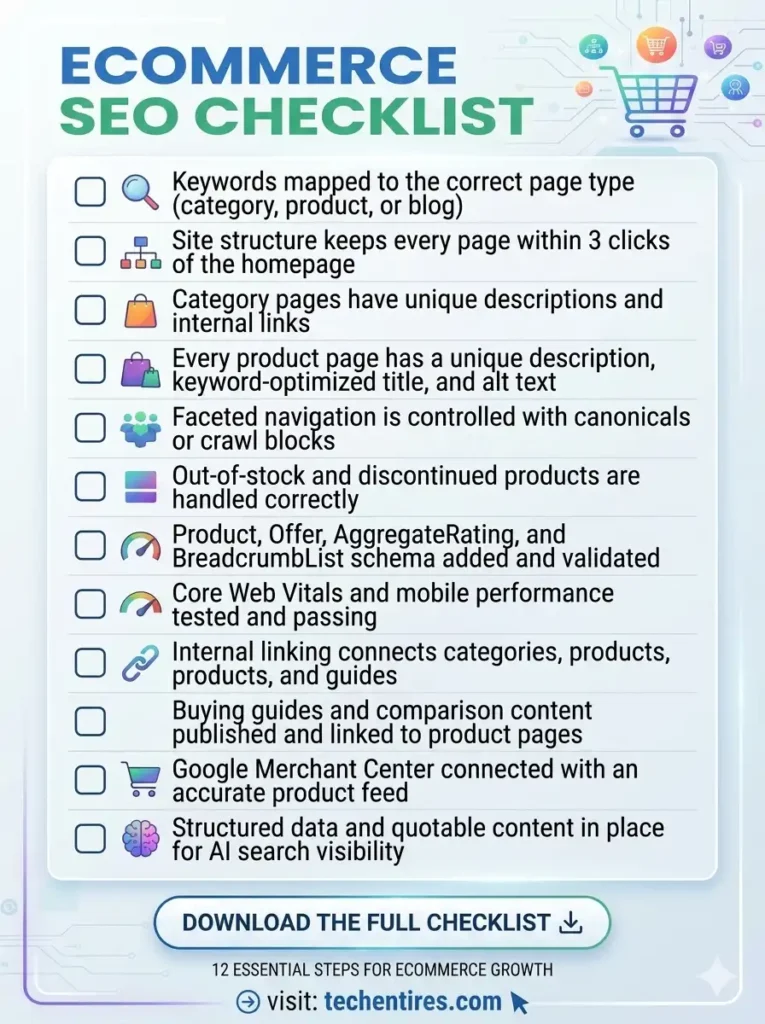
[Insert image: Downloadable ecommerce SEO checklist graphic summarizing all 12 steps]
Frequently Asked Questions
What makes ecommerce SEO different from regular SEO?
The fundamentals, titles, content quality, internal links, are the same. The difference is scale and page type: ecommerce sites deal with large product catalogs, faceted navigation, duplicate content risk across product descriptions, and inventory changes that regular websites and blogs simply don’t face.
Do I really need schema markup for every product?
Yes, if you’re serious about competing. Product, Offer, and AggregateRating schema enable rich results that improve click-through rate, and they’re also the structured data that AI shopping engines rely on to decide what to recommend. It’s close to essential for competitive product rankings in 2026.
How do I handle out-of-stock products without losing rankings?
Keep the page live with a 200 status if the item is temporarily unavailable, and show similar or recommended products so the page still offers value to visitors and crawlers. Only use a 404 or 410 status if the product is permanently discontinued.
Should I target high-competition keywords or long-tail keywords first?
Start with long-tail, more specific keywords, especially if your store is newer. A well-optimized category page targeting a specific long-tail term often ranks for several broader, related variations naturally, without the uphill battle of competing directly against major retailers on day one.
What’s the biggest SEO difference between a small store and a large catalog?
Scale changes which problems matter most. A small store with a few dozen products can usually get by with manual, careful optimization of every page. A large catalog needs systems, templated but unique product description frameworks, automated schema generation, and disciplined faceted-navigation rules, because manual page-by-page optimization simply doesn’t scale past a few hundred products.
How often should I update my ecommerce SEO?
Treat it as ongoing, not a one-time launch task. Review your top category and product pages every few months, keep your Merchant Center feed accurate at all times, and revisit buying guides regularly so the advice stays current.
Is Shopify or WordPress better for ecommerce SEO?
Shopify generally wins on speed, Core Web Vitals, and mobile performance out of the box. WordPress/WooCommerce offers more technical control, custom URLs, deeper schema flexibility, and stronger blogging tools. For most stores, working through the full checklist matters more than the platform choice itself.
Final Thoughts
Ecommerce SEO isn’t a single task you complete before launch, it’s an ongoing system covering keyword mapping, site structure, technical fixes, and content, all working together.
The checklist above covers every layer that actually moves rankings and sales in 2026, from the basics of unique product descriptions to the schema markup and AI-search readiness that decide whether your store gets recommended or skipped.
Work through it category by category, revisit it every time you add new products, and treat it the same way you’d treat inventory management, as infrastructure that needs regular attention, not a one-time setup task.
