There’s a version of this article that starts with “Artificial intelligence is transforming education.” You’ve read that sentence a hundred times. This isn’t that article.
Here’s what’s actually happening: students who figured out how to use AI properly are finishing work faster, understanding concepts more deeply, and going into exams more prepared. Meanwhile, students using AI badly copy-pasting outputs, skipping the thinking part, treating it like a cheat code are falling behind in ways they don’t even realize yet.
This guide covers everything. Which tools are worth your time, how to actually use them for studying, writing, and research, how to stay on the right side of academic integrity, and the mistakes most students are quietly making. If you’ve been piecing this together from random Reddit posts and YouTube videos, this is the one guide you actually needed.
Need to write a research paper? We have a full guide on how to use AI for research papers from finding sources to verifying citations.
FREE DOWNLOAD
AI Tools Cheat Sheet for Students 2026
One page. 7 best free tools, 5 copy-paste prompts, and 3 golden rules — everything in your pocket for exam season. No email needed.
What “Using AI” Actually Means in 2026
A year ago, “using AI” meant opening ChatGPT and asking it to explain something. That’s still part of it, but the landscape has changed.
There are now dozens of AI tools built specifically for students. Some record and transcribe your lectures. Some let you chat directly with your own uploaded notes. Some solve math problems step by step and show the working. Some check your essays for clarity, not just grammar. Some generate practice questions from whatever topic you’re studying.
The students getting the most out of these tools aren’t using one of them they’re using a small stack of them, each for a specific job. Think of it like your phone apps. You don’t use WhatsApp to take photos. You use the right tool for the right task.
The other thing worth knowing: AI doesn’t replace your thinking. It accelerates it. The students who lean on AI to do their thinking for them are building a habit that’s going to hurt them the moment they’re in an exam, a job interview, or any situation where AI isn’t in the room. The students using it to deepen their understanding and test themselves those are the ones actually winning.
Keep that framing in your head as you read everything below.
The Best AI Tools for Students in 2026
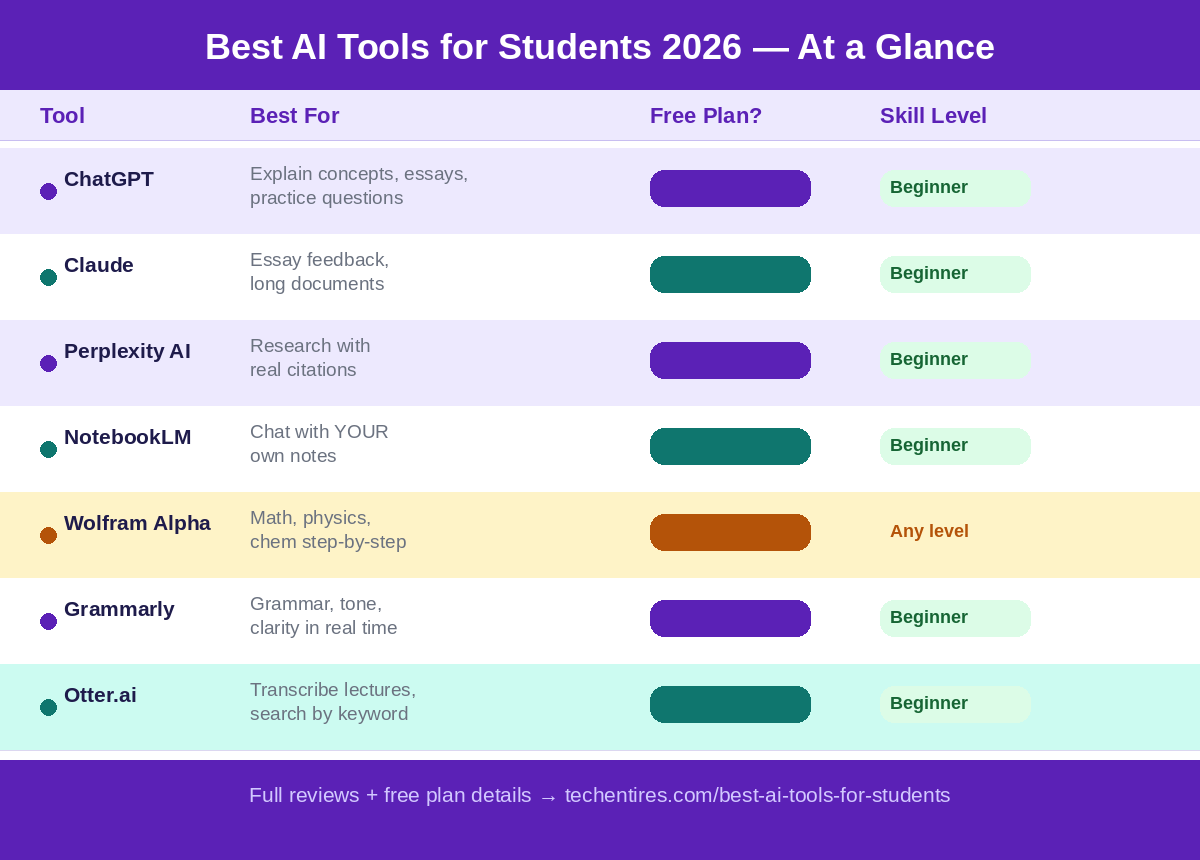
Before getting into how to use AI for specific tasks, here’s a quick map of the tools that actually matter. Each of these has a free plan. None of them require you to be technical.
ChatGPT: is still the most versatile starting point. It explains concepts in plain language, helps with essay brainstorming, generates practice questions, walks through problems step by step, and handles almost any subject. The free tier gives you access to GPT-4o, which is genuinely powerful.
Claude: is the better choice for writing-heavy work. It handles long documents without losing context, gives nuanced feedback on essay structure, and is particularly good at breaking down dense academic readings. Several universities now offer campus-wide free access worth checking before you hit the free tier limits.
Perplexity AI: is what you should be using for research. Unlike ChatGPT, it cites its sources inline, which means you can actually verify what it’s telling you. Toggle Academic mode and your answers pull from peer-reviewed databases. For building the foundation of an essay or checking whether a claim is backed by real research, Perplexity is sharper than anything else in this category.
Google NotebookLM: is the most underrated tool on this list. You upload your own lecture notes, textbook chapters, or PDFs and then have a full conversation with your own material. Ask it to quiz you. Ask it to explain something using only your uploaded sources. It’s the closest thing to having a tutor who has read everything you’ve read.
Wolfram Alpha: exists for one reason: math. Language models like ChatGPT can and do make calculation errors. Wolfram doesn’t. It uses an actual computation engine, not word prediction. For anything in the STEM space calculus, statistics, chemistry, physics Wolfram gives you the correct answer with the full working shown.
Grammarly and QuillBot are the two writing assistants most students already know. Grammarly catches grammar, tone, and clarity issues in real time. QuillBot is better for rephrasing sentences that aren’t quite landing right. Use both. Most universities also offer Grammarly Premium free through institutional licenses check with your IT department before paying for it.
Otter.ai: transcribes and summarizes live lectures. You can search a lecture by keyword after the fact, which handwritten notes will never match. The free tier gives you 300 minutes of transcription per month, which covers most full-time students.
Notion AI: sits inside your workspace and talks to your notes. Take notes in a page, then ask the AI to turn them into a study guide, build a revision schedule, or summarize the week’s reading into bullet points. It replaces three separate apps.
Canva AI: handles presentations and visual content. If you spend more than 20 minutes making slides, you’re wasting time that could go towards actually understanding the material.
For a full breakdown of each tool with exact free plan details and the best use case for each, read our complete guide: 15 Best AI Tools for Students in 2026.
How to Use AI for Studying
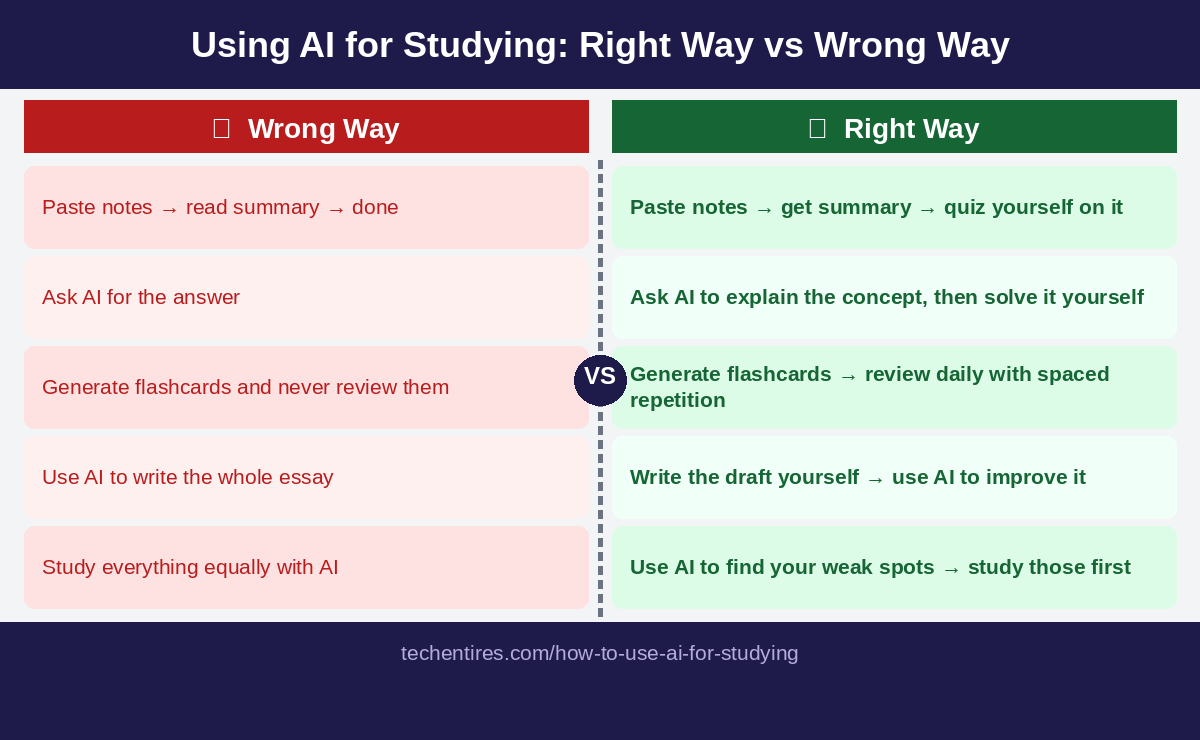
Most students use AI for studying wrong. They read an AI-generated summary and feel like they’ve studied. That’s not studying that’s the illusion of studying.
Real learning happens when you retrieve information from memory, test yourself under pressure, and identify the specific things you don’t know. AI is genuinely excellent at all three of these but you have to ask it for the right things.
Generate flashcards from your own notes. Paste your lecture notes into ChatGPT or Claude and ask it to turn them into question-and-answer flashcards. Then import those cards into Anki or Quizlet and review them using spaced repetition the system that schedules your reviews at increasing intervals to lock things into long-term memory. This single workflow is more effective than rereading notes, full stop.
Build a study plan that actually fits your schedule. Give ChatGPT your exam dates, your subjects, your weak spots, and how many hours you can realistically study each day. Ask for a day-by-day plan. The output won’t be perfect, but it gives you a structure to work from which is already better than most students start with.
Use AI as an exam simulator. Tell ChatGPT: “Act as my exam examiner for [subject]. Ask me one question at a time, wait for my answer, then score me at the end.” This forces you to retrieve information under pressure, which is exactly what exams test. Students who do this consistently report that the real exam feels familiar. That’s not a coincidence.
Chat with your own notes using NotebookLM. Upload everything you have on a topic and ask NotebookLM to quiz you on Chapter 3, or to explain the relationship between two theories using only your uploaded sources. This is the tool most students haven’t discovered yet. Once you do, you’ll wonder how you revised without it.
Full guide with exact prompts that work for each technique: How to Use AI for Studying: 10 Smart Ways.
How to Use AI for Essay Writing
Let’s get the uncomfortable part out of the way first: asking AI to write your essay for you is a bad idea. Not just because it violates academic integrity policies, but because it doesn’t teach you anything, the output is usually generic, and detection tools are improving faster than the writing.
What AI is genuinely useful for, at every stage of the essay process, is something different.
Planning and brainstorming. Before you write a single sentence, describe your essay question to ChatGPT and ask for five different angles you could take on it. Ask it which argument is most defensible given current academic thinking. Ask it what the strongest counterargument would be to each position. You’re not taking its answers you’re using them to sharpen your own thinking before you start.
Structuring your argument. Once you know what you want to say, ask Claude to give you feedback on your essay outline. Does the logic flow? Does paragraph three actually support the thesis? This takes five minutes and fixes structural problems before you’ve wasted hours writing in the wrong direction.
Improving your own writing. After you’ve written a draft in your own words, paste a paragraph into Grammarly or Claude and ask for specific feedback. “What’s unclear here?” “Is this sentence doing what I think it’s doing?” “Does this paragraph actually prove the point, or is it just describing it?” This is the part students skip and it’s where AI adds the most real value for writing.
Citations and references. Perplexity AI cites its sources inline, which makes it useful for finding real papers to support an argument. SciSpace lets you upload a PDF of a dense academic paper and asks questions about it. Both tools save hours of reading. But and this is critical always verify the sources yourself before putting them in your bibliography. AI tools can and do hallucinate citations that don’t exist.
One rule to keep. Write the first draft yourself. Always. Use AI to brainstorm before you write, and to improve after you write. The moment you outsource the writing itself, you’ve stopped learning how to write which is a skill that will matter for the rest of your life.
Read the full stage-by-stage guide with exact prompts: How to Use AI for Essay Writing Without Cheating
How to Use AI for Research Papers
Research is where most students feel the most stuck and where AI genuinely changes the game if you use it correctly.
The problem with research isn’t usually finding sources. It’s understanding which sources are actually relevant, what they’re saying, and how they relate to each other. That’s what AI is good at.
Start with Perplexity AI. Before you go near Google Scholar, describe your research question to Perplexity in Academic mode. Ask it to summarize the current state of research on your topic in three to five sentences. Ask it what the main debates in the field are. Ask it who the key researchers are. This gives you a map of the territory before you start exploring it.
Use SciSpace or Consensus for academic papers. SciSpace lets you upload a PDF and ask questions about it in plain English “What methodology did they use?” “What were their main limitations?” “Does this paper support or contradict the idea that…?” Consensus answers research questions using evidence pulled directly from peer-reviewed papers. Both tools turn hours of reading into minutes.
Use NotebookLM to synthesize. Once you’ve collected your sources, upload them all to NotebookLM. Ask it to identify where the sources agree, where they disagree, and what questions are still unresolved. This is what a literature review is supposed to do and AI helps you see the connections across sources that are impossible to hold in your head at once.
Still read the actual papers. AI tools give you an overview. The depth comes from reading the sources properly. Use AI to help you prioritize which papers deserve your full attention then read those properly.
How to Use AI for Exam Prep
Cramming doesn’t work. Most students know this and do it anyway because they run out of time. AI doesn’t fix the time problem, but it does make the time you do have significantly more effective.
Find your gaps first. Before you start revising, tell ChatGPT what topics your exam covers and ask it to quiz you across all of them at random. Note which questions you can’t answer. Those are your actual revision priorities not the topics you enjoy or the ones you already know.
Use spaced repetition. Generate flashcards from your notes, import them into Anki, and let the algorithm tell you what to review and when. The system is designed around how human memory actually works: you review things right before you’re about to forget them, which builds long-term retention far more efficiently than marathon cramming sessions.
Simulate exam conditions. Ask ChatGPT to give you a timed practice test with the same format as your actual exam multiple choice, short answer, essays, whatever applies. Do it with no notes, under time pressure. Mark it yourself using the AI’s answer key. This is uncomfortable. It’s supposed to be. The discomfort in practice means there’s less surprise on the day.
The night before. Don’t cram. Use NotebookLM to do a final pass through your own notes, asking it to surface the concepts you’ve marked as uncertain. Keep it focused and calm. Trying to learn new material the night before an exam is mostly wasted energy.
Is Using AI Cheating? The Honest Answer
This question comes up constantly, and the honest answer is: it depends, and the line is less clear than most students think.
Every university has a different policy. Some allow AI for brainstorming and editing. Some prohibit any AI use for graded work. Some require disclosure. A growing number have adopted nuanced frameworks that distinguish between using AI as a thinking tool versus using it as a writing replacement. Before you use any AI tool on any graded work, read your institution’s academic integrity policy. Not a summary of it the actual document.
Beyond the policy question, there’s a more practical one: are you actually learning?
If you’re using AI to avoid the thinking part of studying, you’re building a surface-level knowledge that will crack the moment it’s tested under pressure. Exams, oral presentations, job interviews, client meetings none of them allow AI. If you haven’t done the real thinking, it shows.
The students who are genuinely benefiting from AI are using it to think harder, not less. They’re using it to get explanations they couldn’t find in their textbook, to test themselves more rigorously than any past paper could, to get feedback on their writing that their overworked tutor doesn’t have time to give. That’s a legitimate, powerful use of the technology.
The line, practically speaking: if AI is doing the thinking, it’s cheating. If AI is helping you think better, it’s a tool.
Three rules that keep you on the right side:
Write your own first draft, always. AI can brainstorm with you before you write and give feedback after. The writing itself is yours.
Verify everything. AI tools make mistakes, confidently. Every fact, every citation, every claim verify it before it goes into assessed work.
Disclose when required. If your institution requires disclosure of AI use, do it. The academic integrity risk of not disclosing is far higher than the risk of being honest about how you used a tool.
The AI Study Stack Building Yours
You don’t need fifteen apps. You need three to five tools that cover your actual workflow. Here’s a simple starting stack that works for most students:
For understanding concepts: ChatGPT or Claude. Ask it to explain things until they click. Ask follow-up questions. Push back if the explanation doesn’t make sense.
For research: Perplexity AI (for finding and verifying sources) + SciSpace or Consensus (for reading dense academic papers).
For revision: NotebookLM (to talk to your own notes) + Anki or Quizlet (for spaced repetition flashcards).
For writing: Grammarly (always-on grammar and clarity) + Claude (for structured feedback on drafts).
For math or STEM: Wolfram Alpha. Non-negotiable.
For notes and organization: Notion AI. Everything in one place, with AI built in.
Start with two or three. Build the habit. Add more as you need them. Students who try to use six new tools at once end up using none of them properly.
The Mistakes Most Students Are Making
Treating AI output as fact. Language models are trained to produce confident-sounding text. Confidence is not accuracy. Any statistic, citation, or factual claim from a general AI tool needs to be verified independently before it goes anywhere near your work.
Using AI to avoid the hard thinking. Every time you outsource a thinking task to AI, you lose a chance to build a skill. Understanding, analysis, argument construction these are built through practice. AI can support that practice. It can’t replace it.
Using one tool for everything. ChatGPT is not the best tool for research, or for math, or for spaced repetition. Using the right tool for each task takes five minutes to set up and saves hours per week.
Generating flashcards and never reviewing them. Making the flashcards feels productive. Actually reviewing them with spaced repetition is what builds memory. The generation is step one. The review system is the part that actually works.
Starting too late. AI compresses time, but it doesn’t eliminate it. Starting your essay the night before and expecting AI to fix the output is not a strategy. The students getting the most from these tools are using them consistently throughout the semester, not in a panic before deadlines.
Where to Go From Here
This guide covers the landscape. The articles below go deeper on each specific area:
- 15 Best AI Tools for Students in 2026 Full breakdown of every tool, what each one is best for, and exactly what the free plan includes.
- How to Use AI for Studying The specific techniques, prompts, and systems that actually build retention.
- How to Use ChatGPT for Homework Without Cheating The practical guide for using ChatGPT on homework the right way.
- How to Use AI for Essay Writing Without Cheating The 5-stage workflow with exact prompts for brainstorming, research, writing, and editing your essays the right way.
How to Use AI for Exam Prep The complete AI exam prep guide.
Is Using AI Cheating? The Honest Answer : Where the real line is, grey areas, AI detection issues, and what ethical use actually looks like.
The students ahead of you aren’t working harder. They found better tools and figured out how to use them properly. That’s a learnable thing. You just started learning it.
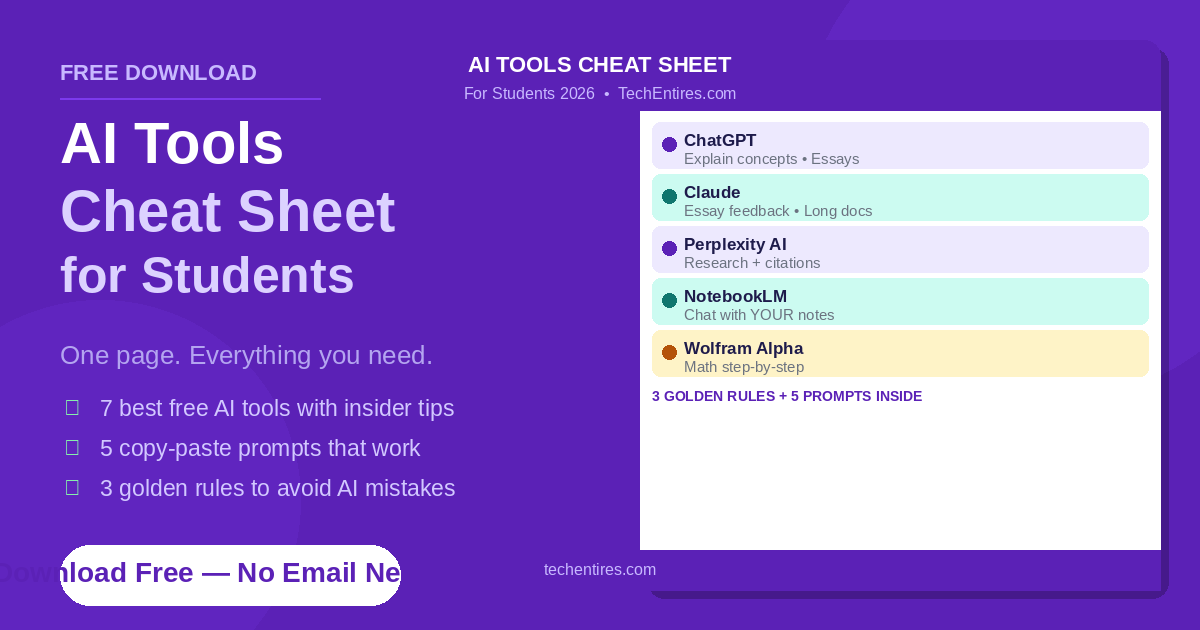
FREE DOWNLOAD
AI Tools Cheat Sheet for Students 2026
One page. 7 best free tools, 5 copy-paste prompts, and 3 golden rules — everything in your pocket for exam season. No email needed.
