
Think about how many devices are sitting in your home right now. A laptop, a smartphone, maybe a tablet or two. Each one connects to the internet every single day and each one is a potential target.
Cyberthreats aren’t just a problem for big corporations anymore. Everyday users get hit with malware, ransomware, phishing scams, and identity theft more than ever before. So the question isn’t whether you need protection it’s which protection actually delivers.
That’s exactly where McAfee Total Protection comes in. It’s one of the most well-known internet security suites on the market, designed to cover all your devices under one subscription. But does it live up to its name? Let’s take an honest look.
What Is McAfee Total Protection?
McAfee Total Protection is a full-scale cybersecurity suite that goes well beyond basic antivirus software. It combines device security, web protection, and identity safety into a single, easy-to-manage platform covering Windows PCs, Macs, Android, and iOS devices.
Here’s a quick breakdown of what it covers:
Device Protection (PC & Mobile): Guards your devices against viruses, malware, spyware, and ransomware using a real-time antivirus engine and a customizable firewall.
Web Protection: Shields you while browsing by blocking dangerous websites, removing trackers, and warning you before you land on a phishing page. Higher-tier plans include a built-in secure VPN for encrypted browsing on public Wi-Fi.
Identity Protection: Monitors the web and dark web for signs of identity theft, stores your passwords securely with a built-in password manager, and on premium plans even offers identity theft insurance coverage.
It’s a genuinely comprehensive package. Not every feature is perfect, but the overall protection it delivers is hard to argue with.
A Clean Interface That Actually Makes Sense
One thing that immediately stands out with McAfee Total Protection is how organized it feels to use. Everything is sorted into three clear categories PC, Web, and Identity and each section surfaces exactly the tools you’d expect to find there.
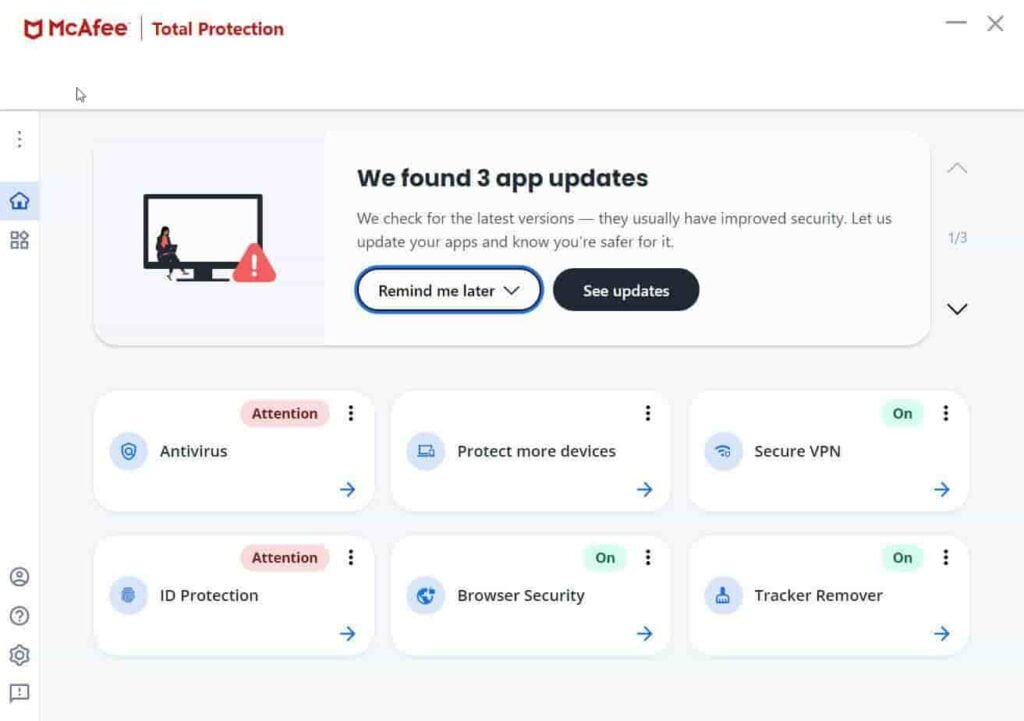
Click on PC and you get Antivirus, Firewall, App Boost, and Secure Apps. Head over to Web and you’ll find Browser Security, Web Boost, Tracker Remover, and the Secure VPN. The Identity tab covers ID protection, Password Manager, File Shredder, and File Lock.
Additional tools like the home network scanner, spam filter, and parental controls sit neatly under Settings so the main dashboard never feels cluttered.
It’s the kind of interface that doesn’t require a tutorial. You open it, you find what you need, and you move on with your day.

Real-Time Scanning: Always-On Protection That Works
The heart of any antivirus suite is its malware detection engine and McAfee’s is genuinely impressive.
Real-time scanning runs quietly in the background, checking every file you open, every email attachment you download, and every link you click. The moment something suspicious is detected, it’s flagged and quarantined before it can do any damage.
In independent lab tests by AV-TEST, McAfee consistently scores at or near the top for malware detection blocking 100% of known threats and performing exceptionally well against zero-day attacks. That kind of reliability matters when the stakes are your personal data and financial information.
One honest caveat though: full system scans can slow down your PC noticeably while they’re running. It’s not a dealbreaker you can schedule scans overnight or whenever your device is idle but it’s worth knowing upfront.
Windows-Specific Features Worth Mentioning
McAfee’s Windows app received a thoughtful redesign recently, and it shows. The layout is cleaner, less cluttered, and much easier to navigate at a glance.
A message carousel at the top of the screen keeps you informed about features that aren’t yet set up or apps that need updating similar to how Bitdefender handles its dashboard. It’s a small touch, but it keeps you proactive without being annoying.
The built-in VPN is worth highlighting separately. Unlike some competitors that offer VPNs as expensive add-ons, McAfee includes it directly within the app. You get unlimited data as long as your subscription is set to auto-renew a significant advantage over products that cap your VPN usage or charge extra for it.
Just keep in mind: the VPN is optimized for privacy and security, not for streaming or bypassing geo-restrictions. If that’s your primary use case, a dedicated VPN service would serve you better. But for safe browsing on public Wi-Fi networks, it works exactly as it should.
McAfee Total Protection Pricing What Do You Actually Get?
McAfee offers several pricing tiers depending on how many devices you need to protect:
- Basic (1 device): ~$29.99/year includes antivirus, firewall, identity monitoring, and VPN with auto-renewal
- Essential (5 devices): ~$39.99/year same feature set, expanded coverage
- Premium (Unlimited devices): ~$49.99/year adds Personal Data Cleanup to remove your info from data broker sites
- Advanced: Adds $1M identity theft coverage, bank and credit card monitoring, and identity restoration support
The sweet spot for most households is the Essential or Premium plan. Protecting five or more devices for under $50 a year works out to just a few dollars per device and the jump to unlimited coverage is surprisingly affordable.
A 30-day free trial is available with no credit card required, which is a nice way to test everything before committing.
One thing to watch: introductory pricing is very competitive, but renewal rates are higher. Make sure you check the renewal cost before subscribing so there are no surprises down the road.
What We Like And What Could Be Better
There’s a lot to appreciate about McAfee Total Protection. The malware protection is best-in-class. The interface is clean and easy for non-technical users. The VPN inclusion with unlimited data is a genuine value-add. And the File Shredder which permanently destroys sensitive files beyond recovery is one of those features you don’t know you need until you really need it.
That said, no product is perfect. The full scan does impact system performance while running. The VPN won’t unblock streaming services. And renewal pricing can catch users off guard if they aren’t paying attention.
But stepping back and looking at the full picture? McAfee Total Protection delivers on its promise. It’s a well-rounded, reliable internet security suite that protects your devices, your browsing, and your identity all from a single dashboard.
Final Verdict: Should You Get McAfee Total Protection?
If you’re looking for solid, no-fuss antivirus and internet security that covers multiple devices without breaking the bank, McAfee Total Protection is a genuinely strong choice.
It’s not the absolute cheapest option out there. And if you already have a dedicated VPN or password manager, some features may feel redundant. But for most households especially those with multiple devices and family members to protect the value it delivers is hard to beat.
Bottom line: McAfee Total Protection earns its reputation. Try it free for 30 days and see how it fits your needs. If you have a home full of devices and want real peace of mind, this is one of the better investments you can make in your online security.
