
If you’ve been on Facebook for more than a few years, your account is probably a complete mess.
Pages you liked back. Friend requests sitting there unanswered for months. Groups you joined and completely forgot about. Old comments that don’t represent who you are anymore. Videos you want to save but can’t.
Cleaning all of that up manually? You’d be sitting there for days.
That’s exactly where the Toolkit for Facebook comes in. It’s a free Chrome extension that turns hours of manual work into a few minutes. No technical skills needed. Just install it, open Facebook, and start cleaning up.
What Is the Toolkit for Facebook?
The Toolkit for Facebook also known as Facebook Social Toolkit or Toolkit for Facebook by Plugex is a Google Chrome extension that combines all your Facebook bulk action tools into one simple, easy-to-use interface.
Instead of going through hundreds of friends, pages, or groups one by one, you can manage everything in bulk with just a few clicks. It works on all Chromium-based browsers including Chrome, Brave, and Microsoft Edge.
It’s completely free to use, requires no extra login, and is one of the most complete Facebook automation tools available today. Thousands of users rely on it every day to keep their accounts clean and organised.
Facebook Social Toolkit – Features
How to Unlike All Facebook Pages at Once
Your news feed is full of pages you liked years ago and never look at. This feature removes all your Facebook page likes in bulk — instantly. No more scrolling through your liked pages list and removing them one by one. One click and it’s done.
How to Unfriend All Facebook Friends at Once
Want to start fresh or clean up before deactivating? This feature lets you mass unfriend on Facebook and remove all connections at once. It saves hours compared to visiting each profile individually and works smoothly even with thousands of friends.
Unfollow All Friends on Facebook
Want to stay connected but stop seeing certain posts? The unfollow feature lets you clean up your Facebook newsfeed without actually unfriending anyone. Unfollow everyone at once, or go through them in batches, your choice.
Leave All Facebook Groups at Once
Too many group notifications ruining your day? Leave all Facebook groups instantly with one click. Once you’ve cleared them out, you can selectively rejoin only the ones that are actually worth your time.
Delete All Facebook Comments at Once
Old comments on posts you’d rather forget? This tool finds and removes all your comments across Facebook in bulk. It’s perfect for cleaning up your digital footprint before deactivating your account or simply for privacy reasons.
Cancel All Pending Facebook Friend Requests
Sent too many friend requests that were never accepted? This feature lets you cancel all pending Facebook friend requests at once — no awkward one-by-one cancellations, no manual searching.
Accept All Friend Requests at Once
On the flip side, if you have a large backlog of incoming friend requests, you can accept all of them in one go. Great for public figures, page admins, or anyone who gets a high volume of requests regularly.
Reject All Friend Requests at Once
Don’t want to accept requests from people you don’t know? Reject all incoming friend requests at once cleanly and quickly without having to go through each one individually.
Send Multiple Friend Requests at Once
Growing your Facebook network? Instead of sending requests one profile at a time, this feature lets you send multiple friend requests at once to a list of profiles, saving you a significant amount of time.
Invite Friends to Events at Once
Promoting an event? The event invitation tool for Facebook lets you invite your entire friends list to any Facebook event in one click instead of selecting people one by one. Perfect for businesses, content creators, and community organisers.
Invite All Friends to Like a Page or Join a Group
Growing a Facebook page or community? Invite your entire friends list at once. Whether it’s a business page, fan page, or group, this feature handles bulk invitations instantly and saves you hours of manual outreach.
Facebook Video Downloader
One of the most popular features. Download Facebook videos directly to your device in just a few clicks — no third-party websites needed, no watermarks. Supports public videos from your feed, pages, and groups.
Facebook ID Extractor
Built for marketers. Extract Facebook IDs from profiles, pages, and group members quickly and accurately. Useful for building custom audiences for Facebook ads, managing CRM data, and running targeted campaigns.
Facebook Group Member Extractor
Need a full list of members from a Facebook group? This tool extracts all group member data at once, names, profile links, and IDs, giving you a clean list you can use for outreach or ad targeting.
Toolkit for Facebook Free vs Premium
Both versions are available for free download on this page.
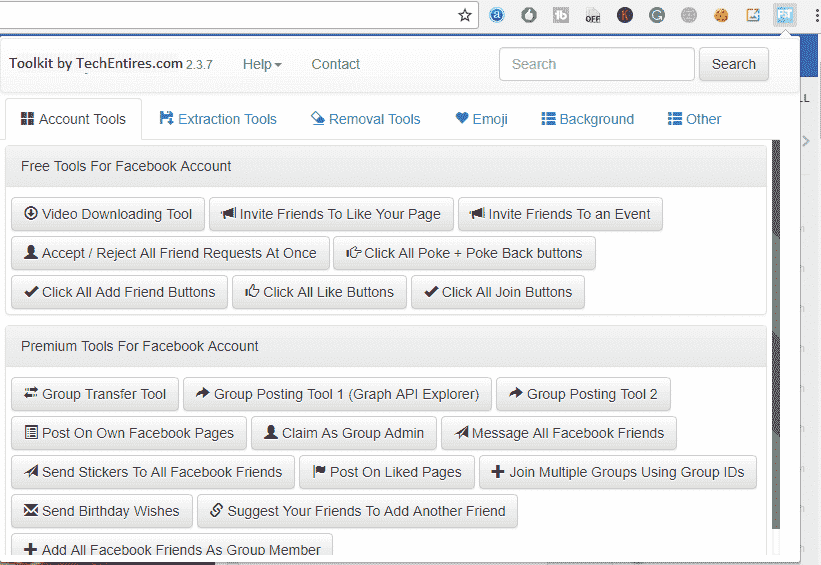
The free version covers all the essential tools, unlike pages, unfriend all, unfollow, leave groups, delete comments, accept and reject friend requests, and the Facebook video downloader.
The TFF Premium version (Toolkit for Facebook Premium) also available free here, adds the more advanced tools like bulk messaging, post scheduling, group member extraction, Facebook ID extractor, and Facebook account cleanup automation.
It’s one of the most complete free Facebook management tools you’ll find anywhere right now.
How to Download and Install Toolkit for Facebook
Since Google removed this extension from the Chrome Web Store, you’ll need to install it manually as a .crx file. It’s simple and takes under two minutes.
Looking for a safe way to download Facebook Social Toolkit? This guide covers the step-by-step process to get the latest version without risking malware or scams. Learn how to verify the official source and install it securely.
By following these steps, you can download Facebook Social Toolkit safely and avoid common fake links or viruses.
It’s easy to install the Facebook Toolkit extension on the Google Chrome browser.
Step 1: Click the Download button on this page to get the latest .crx file.
Step 2: Open Chrome and type chrome://extensions/ in your address bar.
Step 3: Turn on Developer Mode using the toggle in the top right corner.

Step 4: Drag and drop the downloaded .crx file directly onto the extensions page.
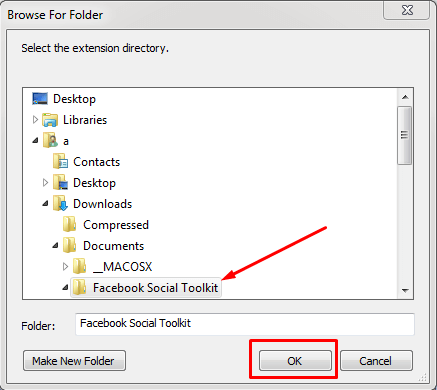
Step 5: Click “Add Extension” when the popup appears.
Step 6: Open Facebook in a new tab, the toolkit toolbar will appear automatically.
7). It will ask you for an email address and license key. Enter your registered email address and the license key you received upon download, then click on unlock.”
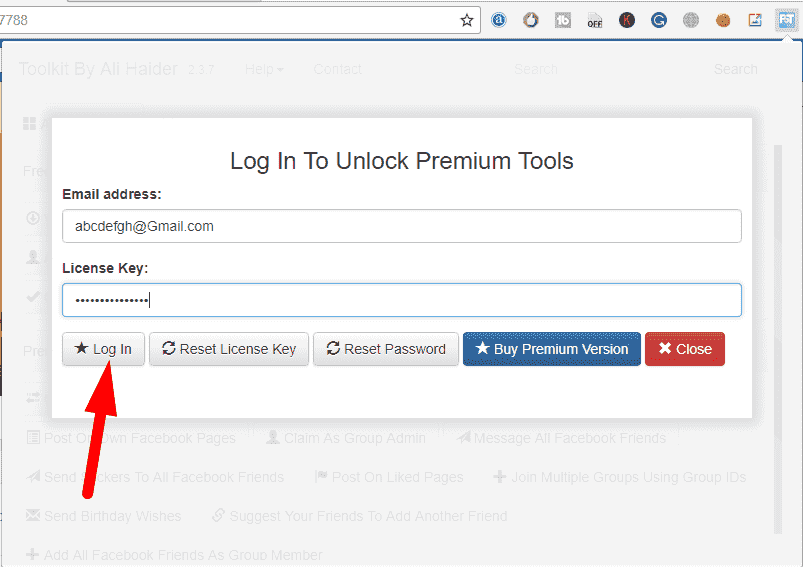
That’s it. The whole process takes under two minutes and you only need to do it once.
Now, it will successfully unlock all the premium features of the Facebook Premium Social Toolkit Extension. Now you are ready to enjoy! Please share this post with your friends. Always download from a trusted source. This page provides the original, clean, virus-free version of the Toolkit for Facebook.
“Download Facebook Social Toolkit Free — Latest Version”
Facebook ToolKit
File Size: 1.42 MB, Price: Free
Download Link 1 (MediaFire) > Link 1
Download Link 2 (Google Drive) > Link 2
Is the Toolkit for Facebook Safe to Use?
Fair question, here’s an honest answer. The Toolkit for Facebook is a third-party Chrome extension, not an official Meta or Facebook product. It works by automating actions on your behalf, the same clicks you’d make manually, just much faster.
It does not collect your personal data, does not store your login credentials, and everything runs locally within your own browser. That said, use it sensibly. Running bulk actions too aggressively in a short period of time can trigger Facebook’s spam detection and temporarily restrict your account.
The best approach is to use one feature at a time, let it complete fully before starting the next one, and avoid running everything back to back in one session. Millions of users have used this toolkit over the years without any problems. Be reasonable with it and your account will be perfectly fine.
Who Should Use This?
Regular Facebook users who want to declutter an old, messy account will find this saves hours of work. People planning to deactivate Facebook often use it to remove all friends, unlike all pages, and clean up comments before they leave.
Digital marketers use the Facebook ID extractor, group member extractor, and invite features to manage pages and run more targeted ad campaigns. Community managers handling multiple groups and pages save significant time with the bulk invite and leave tools.
Content creators and event organisers use the event invitation tool to promote events to their full friends list instantly. And anyone who cares about their Facebook privacy will find the comment deletion and unfriend tools genuinely useful.
Frequently Asked Questions
Is the Toolkit for Facebook really free? Yes. Both the free and TFF Premium versions are available on this page at no cost. No payment or account creation required.
Does it work in 2026 with the latest Chrome version? Yes. This page is always updated with the latest working version. It has been tested with the most recent Chrome update.
Will I get banned for using this? There’s a small risk if you run bulk actions at very high speed non-stop. Use one feature at a time, don’t rush through everything in one session, and your account will be fine. This tool has been used by millions of people over the years.
Why was it removed from the Chrome Web Store? Google periodically removes third-party automation extensions. The extension itself works perfectly — you just install it manually using the .crx method described above, which takes under two minutes.
What is Toolkit for Facebook by Plugex? Plugex is the original developer behind the Toolkit for Facebook extension. The tool is often referred to as “Toolkit for Facebook by Plugex” or simply “TFF”. The version available on this page is the latest working build.
Does it work on Firefox or Safari? No. It’s built as a Chrome extension and works on Chromium-based browsers only Chrome, Brave, and Microsoft Edge. Firefox and Safari are not supported.
Does it work on mobile? No. Chrome extensions only work on desktop browsers. You’ll need a computer to use it.
Can I use the Facebook video downloader for any video? It works on most public Facebook videos from your feed, pages, and groups. It does not work on private videos or content you don’t have access to.
What is TFF Premium? TFF Premium is the advanced version of Toolkit for Facebook with extra features including bulk messaging, post scheduling, group member extraction, and more. The premium version is available free on this page.
Download Facebook Social Toolkit Safely & Boost Your Productivity!
Now that you know how to install Facebook Social Toolkit safely, it’s time to take action! This powerful free social media tool helps you manage pages, schedule posts, and analyze performance, all in one place. Remember:
✅ Always download from trusted sources to avoid malware.
✅ Follow our step-by-step installation guide for a hassle-free setup.
✅ Check the latest version for compatibility and new features.
Final Thoughts
If you want a fast, free, and simple way to manage your Facebook account, whether you’re cleaning it up, deactivating it, or using it for marketing. the Toolkit for Facebook is genuinely one of the best tools available right now.
It turns hours of manual clicking into a few minutes of work. Download the latest version below, follow the two-minute installation steps, and take full control of your Facebook.
Want more tips? Bookmark this page for future updates, and share it with friends who need a safe Facebook toolkit!
Questions about installation or any of the features? Leave a comment below — we’ll get back to you.
Overall, this tool offers a variety of options. This review is a very basic overview. I hope to digest it all over the next month or so. I will write a follow-up post on anything I find. There’s more to come! #TalentSourcingMagic You can download the ToolKit for FB desktop Tool – January Update (here).