If you run a WordPress site and want to earn from display ads, sooner or later you face the same question: should you use Advanced Ads or Ad Inserter? Advanced Ads vs Ad Inserter
Both plugins can place ads inside posts, pages, widgets, headers, footers, and other parts of your site. Both work with popular ad networks like Google AdSense and Google Ad Manager. Both have free versions. And both are powerful enough for bloggers, niche site owners, and larger publishers.
But they do not feel the same.
Ad Inserter is more like a control panel for people who want precise placement rules and do not mind working through many settings. Advanced Ads feels more structured, especially if you prefer creating ads, groups, placements, and conditions in a cleaner workflow.
So the better choice depends on your site, your skill level, and how complex your ad setup is.
Which Plugin Should You Choose?
Choose Advanced Ads if you want a cleaner workflow, easier ad management, strong AdSense support, and a plugin that feels more beginner-friendly as your site grows.
Choose Ad Inserter if you want maximum control over where ads appear, need many insertion positions, and are comfortable handling detailed settings from one powerful dashboard.
For most beginners and growing bloggers, Advanced Ads is easier to manage.
For technical users, ad-heavy sites, and publishers who want exact placement control, Ad Inserter is hard to beat.
Advanced Ads vs Ad Inserter: Quick Comparison Table
| Feature | Advanced Ads | Ad Inserter |
|---|---|---|
| Best for | Bloggers, publishers, AdSense users, growing sites | Technical users, ad-heavy sites, advanced placement control |
| Ease of use | Cleaner and more guided | Powerful but denser |
| Ad placement | Strong placement system | Very flexible insertion rules |
| AdSense support | Strong | Strong |
| Google Ad Manager support | Strong, especially with integrations | Strong |
| Conditions and targeting | Good free options, more in Pro | Very detailed settings |
| Ad rotation | Available | Available |
| Tracking | Premium/add-on based | Pro feature |
| Ad blocker features | Available in premium options | Available in Pro |
| Best free version | Easier for normal users | More flexible for technical users |
What Advanced Ads Does Best

Advanced Ads is built around a simple idea: create an ad, choose where it should appear, then control when and to whom it should show.
That sounds basic, but it matters. A lot of WordPress users do not want to stare at a wall of settings just to place one AdSense unit after the second paragraph. Advanced Ads makes the process easier to understand because it separates ads, placements, groups, and conditions.
Its strongest areas are:
- A cleaner ad management workflow
- Good support for Google AdSense
- Ad placements without editing theme files
- Display conditions for posts, pages, categories, tags, and other areas
- Visitor conditions such as device targeting
- Ad groups and rotation
- Premium add-ons for tracking, sticky ads, popups, AMP, lazy loading, and Google Ad Manager
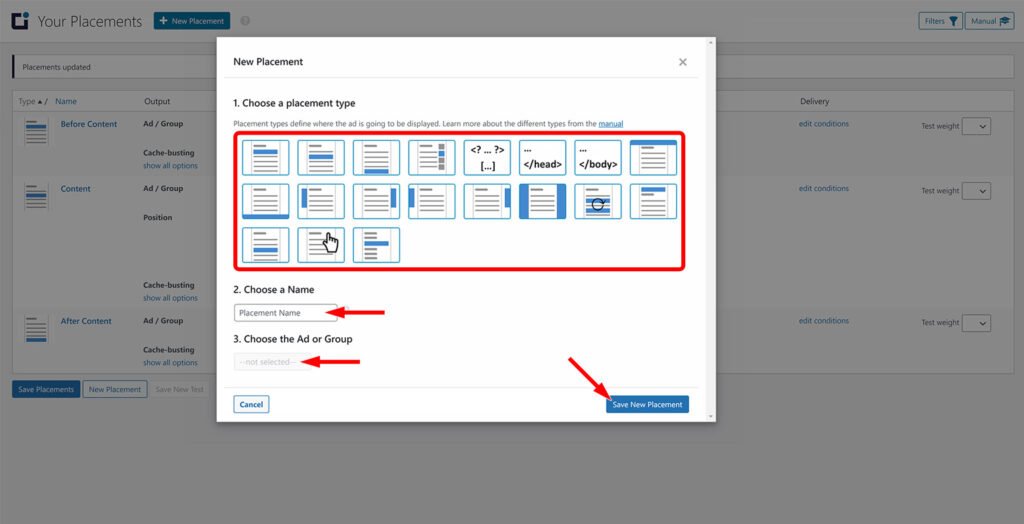
Advanced Ads is especially useful if you want to manage ads like a system instead of just pasting code into random parts of your site.
For example, you can create one AdSense ad, assign it to a placement, and later change the ad code without editing every post. If you publish a lot of content, that saves time.
What Ad Inserter Does Best
Ad Inserter is popular because it gives you serious control.

The plugin is known for letting you insert almost any type of code into many different positions across a WordPress site. That can include AdSense code, Google Ad Manager tags, affiliate banners, tracking scripts, header scripts, footer scripts, custom HTML, and more.
Its strongest areas are:
- Many automatic insertion positions
- Strong paragraph-level ad placement
- Header and footer code insertion
- Device-based control
- Category, tag, post, and page targeting
- Shortcode and widget support
- Support for AdSense, Google Ad Manager, Media.net, Amazon ads, and custom banners
- Debugging tools for ad placement
- Pro features like geotargeting, A/B testing, click tracking, click fraud protection, and lazy loading
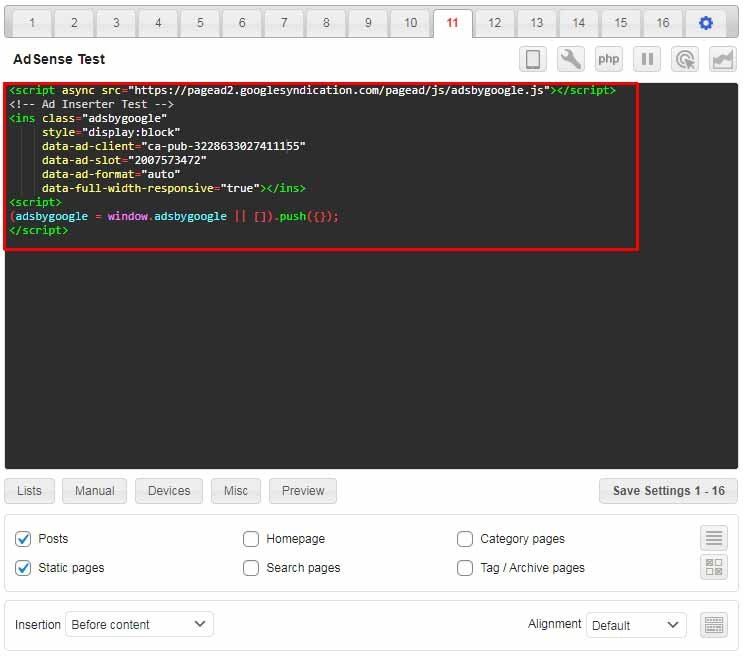
Ad Inserter is excellent if you already know where you want ads and want the plugin to follow your exact rules.
For example, if you want one ad after paragraph 3, another after paragraph 7, no ads in one category, a sticky ad on desktop only, and a header script on selected pages, Ad Inserter gives you the tools to do that.
The trade-off is that the interface can feel busy at first.
Ease of Use: Which Plugin Is Better for Beginners?

Advanced Ads is easier for most beginners.
The reason is not that Ad Inserter is bad. It is because Ad Inserter gives you a lot of options immediately. That is great when you know what you are doing, but it can be intimidating when you only want to add your first ad.
Advanced Ads feels more organized. You create an ad, pick an ad type, choose placement, and adjust conditions. The workflow is easier to follow.
Ad Inserter, on the other hand, often feels faster for experienced users. Everything is close together, and you can control many ad blocks from one place. Once you learn it, it becomes efficient.
Beginner verdict:
- Advanced Ads wins for ease of use.
Power-user verdict:
- Ad Inserter wins for control and speed.
Ad Placement and Targeting Options
Both plugins can place ads in common locations:
- Before content
- After content
- Inside post content
- After selected paragraphs
- Sidebar widgets
- Shortcodes
- Header and footer areas
- Specific posts or pages
- Categories and tags
- Desktop or mobile devices
Ad Inserter has an edge when you want very specific insertion behavior. It is built for granular placement rules and gives you a lot of control over where code appears.
Advanced Ads is better when you want a more organized placement system that is easier to manage over time.
If your ad strategy is simple, either plugin can work.
If your strategy is complex, ask yourself this:
Do I want a structured ad workflow, or do I want maximum insertion control?
That answer usually decides the winner.
AdSense and Google Ad Manager Support
Both plugins work with Google AdSense.
Advanced Ads has strong AdSense-focused features and a workflow that makes it easier for normal publishers to manage ad units. It is also strong for publishers who may later move toward Google Ad Manager or more advanced monetization setups.
Ad Inserter also supports AdSense and Google Ad Manager well. Its strength is that you can paste and control almost any ad code exactly where you want it.
For AdSense beginners, Advanced Ads may feel easier.
For users who already understand ad code and placement logic, Ad Inserter may feel more flexible.
Performance and Site Speed
No ad plugin can magically make ads lightweight. Ads themselves often slow down websites because they load scripts, third-party requests, tracking, and media.
That said, the plugin you choose still matters.
Advanced Ads and Ad Inserter can both be used on fast websites if configured properly. The real problems usually come from:
- Too many ad units on one page
- Heavy third-party scripts
- Poor ad placement
- No lazy loading
- Too many tracking tags
- Ads placed above important content
- Layout shift from ad containers without fixed sizes
If site speed is important, use fewer ads, reserve ad space to reduce layout shift, test mobile pages, and avoid loading unnecessary ad scripts on pages where ads are disabled.
Ad Inserter Pro includes performance-focused controls such as lazy loading and delayed loading. Advanced Ads also offers performance-related premium features such as lazy loading through add-ons.
Performance verdict:
- Both can be fast or slow depending on setup. The plugin matters, but your ad strategy matters more.
Pricing and Free Version Comparison
Both plugins offer free versions, and both reserve advanced features for paid plans.
The free version of Advanced Ads is enough for many bloggers who need basic ad placement, AdSense support, and display conditions.
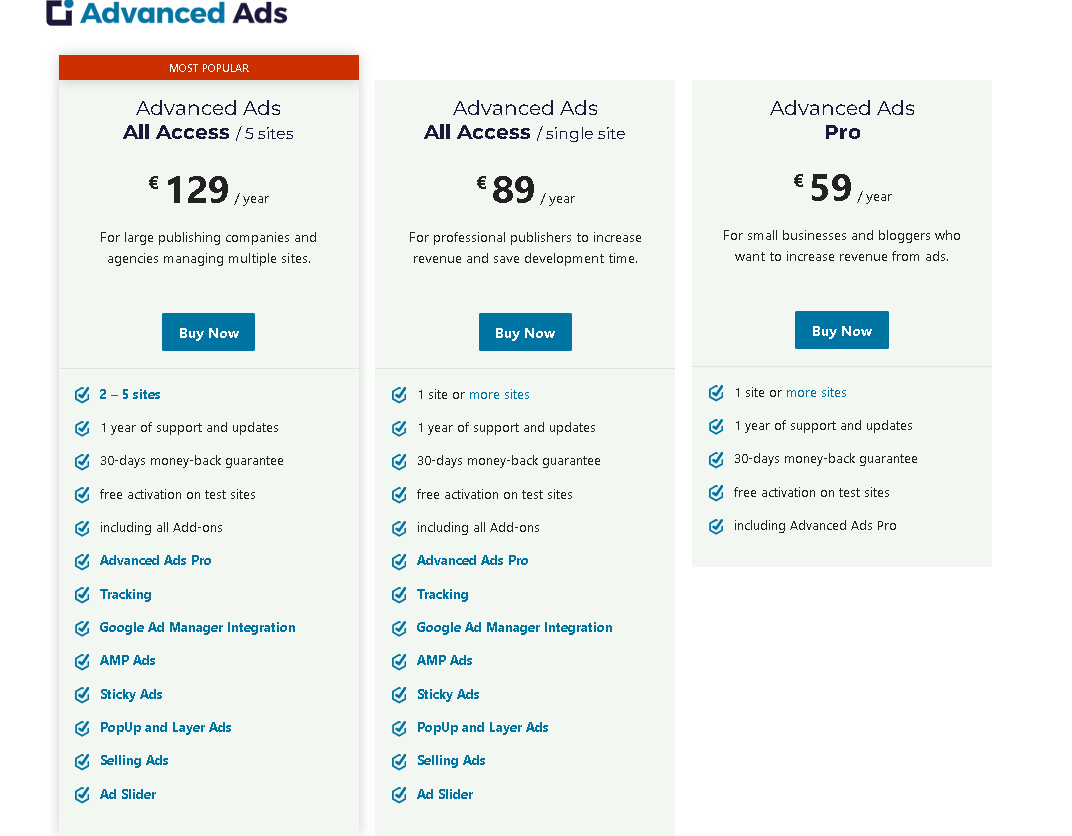
Advance Ads Pricing
The free version of Ad Inserter is also very capable, especially for users who want flexible ad insertion without paying immediately.
Ad Inserter Pricing
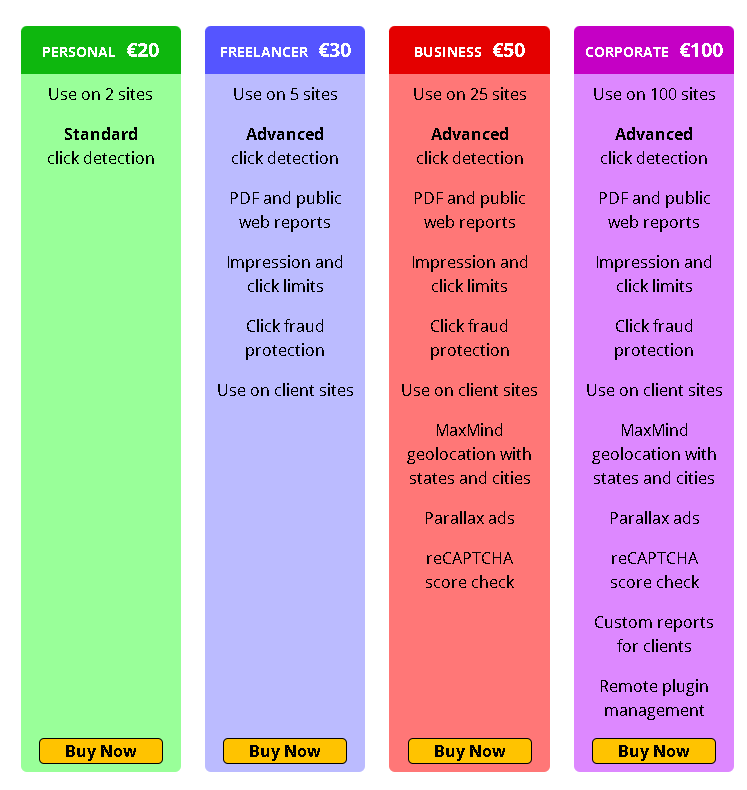
Paid features become important when you need things like:
- Advanced tracking
- A/B testing
- Geotargeting
- Click fraud protection
- Ad blocker detection
- Sticky ads
- Popups
- Advanced Google Ad Manager workflows
- Lazy loading
- More detailed visitor targeting
If you are just starting a blog, begin with the free version. Upgrade only when you know which feature is actually missing.
Advanced Ads Pros and Cons
Pros
- Easier for beginners
- Cleaner ad management workflow
- Strong AdSense support
- Good placement system
- Useful display and visitor conditions
- Better for managing ads as your site grows
- Strong premium ecosystem
Cons
- Some advanced features require paid add-ons
- Power users may want more direct control
- Premium setup can become costly if you need many add-ons
Ad Inserter Pros and Cons
Pros
- Very flexible ad placement
- Excellent for precise insertion rules
- Supports many types of code
- Strong free version
- Good for technical users
- Useful for header, footer, and paragraph-level placement
- Pro version includes advanced publisher features
Cons
- Interface can feel dense for beginners
- More settings mean more chances to misconfigure ads
- Less guided than Advanced Ads
Best Plugin by Use Case
Best for beginners
Advanced Ads.
It is easier to understand and manage if you are new to WordPress monetization.
Best for technical users
Ad Inserter.
It gives more direct control over placement, conditions, and code insertion.
Best for AdSense bloggers
Advanced Ads for simplicity. Ad Inserter if you want more placement control.
Best for complex ad placement
Ad Inserter.
It is especially useful when you want ads in very specific locations or need detailed rules.
Best for organized ad management
Advanced Ads.
Its ad, group, placement, and condition structure makes long-term management easier.
Best free option
This depends on your comfort level. Advanced Ads is friendlier. Ad Inserter is more flexible.
Final Verdict
Advanced Ads and Ad Inserter are both strong WordPress ad management plugins, but they are built for slightly different users.
If you want a cleaner workflow and easier ad management, choose Advanced Ads.
If you want deep control and do not mind a more technical interface, choose Ad Inserter.
For most bloggers in 2026, Advanced Ads is the safer starting point because it is easier to manage and understand. For publishers who already know exactly how they want to place ads, Ad Inserter may be the better long-term tool.
The best advice is simple: do not choose the plugin with the longest feature list. Choose the plugin you can manage correctly.
A simple ad setup that is clean, fast, and well placed will usually perform better than a complicated setup that slows down your site and annoys readers.
FAQ
Which is better, Advanced Ads or Ad Inserter?
Advanced Ads is better for beginners and users who want a cleaner workflow. Ad Inserter is better for advanced users who want detailed placement control.
Is Ad Inserter good for AdSense?
Yes. Ad Inserter works well with Google AdSense and lets you place AdSense code in many positions across a WordPress site.
Is Advanced Ads free?
Yes. Advanced Ads has a free version on WordPress.org. Some advanced features require premium add-ons.
Can I insert ads after paragraphs in WordPress?
Yes. Both Advanced Ads and Ad Inserter can insert ads inside post content, including after selected paragraphs.
Which plugin is easier for beginners?
Advanced Ads is usually easier because its workflow is more structured and less overwhelming.
Does Ad Inserter slow down WordPress?
Ad Inserter itself is not usually the main problem. Ads, third-party scripts, tracking tags, and too many placements are what usually slow down a page.
Does Advanced Ads work with Google Ad Manager?
Yes. Advanced Ads supports Google Ad Manager workflows, especially through its premium integrations.
Can I use both Advanced Ads and Ad Inserter together?
Technically, yes, but it is usually better to use one ad management plugin. Running both can make ad placement harder to control and troubleshoot.
Which plugin should small bloggers choose?
Small bloggers should usually start with Advanced Ads if they want simplicity, or Ad Inserter if they want more manual control from the beginning.
Which plugin is better for large publishers?
Large publishers may prefer Ad Inserter for precise control or Advanced Ads for a more structured workflow with premium add-ons. The better choice depends on the ad setup.
