Why local SEO is the most underused competitive advantage for small businesses
If you run a local business a shop, a service, a restaurant, a consultancy with a physical location you are competing in the most valuable part of Google search, and most of your competitors are doing it badly.
Local SEO is the practice of optimising your online presence to appear when people nearby search for what you offer. And the data in 2026 makes a compelling case for why this deserves to be your first marketing priority.
According to statistics compiled by digitalapplied.com in April 2026, 46% of all Google searches carry local intent approximately 3.9 billion local searches every single day. Of those searchers, 76% visit a business within 24 hours of performing a local mobile search, and 28% of local searches result in a purchase within that same day.
These are not people browsing casually. They are people who have already decided they want something and are looking for where to get it near them.
The opportunity gap is significant. Research from biziq.com in June 2026, citing Whitespark and BrightLocal ranking factor surveys, found that 64% of small and medium-sized businesses have NAP inconsistencies in at least one major directory, 56% of businesses with a Google Business Profile have not fully optimised it, and only 35% of SMBs have a Google Business Profile at all.
If your business is in that 35% with a properly optimised profile, you are already ahead of more than half your local competitors.
This local SEO guide covers exactly what drives local search rankings in 2026 the Google Business Profile factors that carry the most weight, the on-page signals that matter, how reviews and citations work, and the local link building tactics that are still moving results.
Quick audit before you read further: search Google for your business category and city right now. Do you appear in the Local Pack the map with three business listings at the top of the results? If not, this guide is for you. Businesses in the top three map positions get 126% more traffic and 93% more calls, clicks, and direction requests than those ranked 4 to 10 (Resourcera, July 2026).
“Once your local SEO brings customers to your website, you also need a system to convert them see the complete guide.
What is local SEO and how is it different from regular SEO?
Local SEO is search engine optimisation focused specifically on geographic searches making your business appear when someone nearby searches for your products or services, whether they type ‘plumber near me’, ‘best pizza in Manchester’, or just ‘Italian restaurant’ from a mobile device in your city.
It differs from traditional SEO in one critical way: Google uses a separate algorithm for local search results that weighs different signals. Standard SEO prioritises content quality, backlinks, and technical site health.
Local search ranking adds three location-specific factors on top of those: proximity (how close the business is to the searcher), relevance (how well the business matches the search query), and prominence (how well-known and trusted the business is across the web).
In practice, local SEO operates across two separate surfaces that both require attention:
- Google Maps / Local Pack the map and top three business listings that appear at the top of local search results. This is the most valuable real estate in local digital marketing, with a 43% average click-through rate for the top three positions according to sqmagazine.co.uk in June 2026.
- Local organic results the standard blue-link results that appear below the Local Pack, where local SEO tips including location-focused content, local keyword research, and backlinks determine your position.
A complete local SEO strategy targets both surfaces simultaneously, because the ranking signals for each overlap but are not identical.
Google Business Profile the single highest-leverage local SEO action
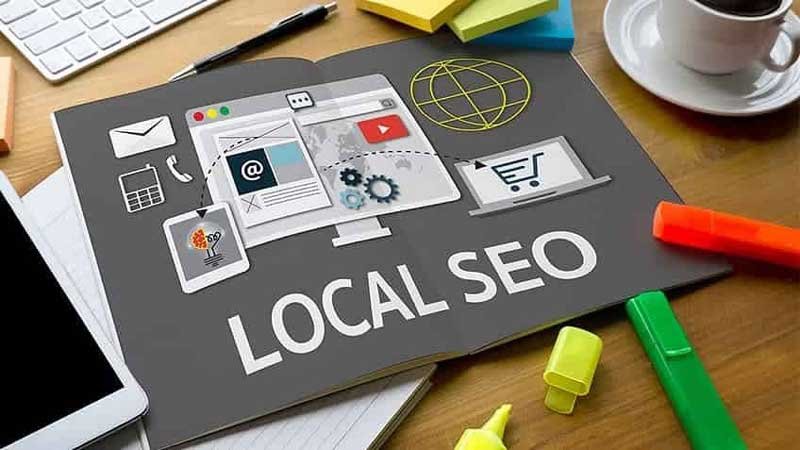
Google Business Profile (GBP), formerly Google My Business, is your free business listing on Google Maps and Google Search. It is the foundation of every local SEO strategy in 2026 and the data on its impact is unambiguous.
According to Google’s own data cited by resourcera.com in July 2026, a complete Google Business Profile makes customers 2.7 times more likely to view a business as reputable and 70% more likely to visit.
GBP signals now account for 32% of local pack ranking weight the single largest factor category in Moz’s Local Search Ranking Factors study, which surveys hundreds of local SEO experts annually.
More practically: Google Business Profile actions calls, direction requests, website visits, bookings increased 41% year-over-year between 2025 and 2026, according to digitalapplied.com.
How to optimise Google Business Profile for local SEO
- Claim and verify your profile. Go to business.google.com and claim your listing. Verify via postcard, phone, or video verification is required before your profile appears in Maps and the Local Pack.
- Choose the most accurate primary category. Your primary category is the single most important field in your GBP. It tells Google what your business does. Be as specific as possible ‘Italian Restaurant’ outperforms ‘Restaurant’ for Italian food searches. You can add secondary categories for additional services.
- Write a complete, keyword-rich description. Research from local SEO tool Localo, cited by Shopify, found that top-ranking Google Business Profiles have around 70 words in their descriptions. Include your primary service, location, and what makes your business different naturally, not stuffed with keywords.
- Add all service areas and hours. Accurate, complete hours reduce the 62% of consumers who would avoid a business with incorrect online information (BrightLocal). Update hours for holidays and special events.
- Upload photos consistently. Profiles with photos receive 42% more direction requests and 35% more website clicks according to Google data. Add new photos monthly Google’s algorithm rewards recency and activity.
- Post regularly to your GBP. Profiles with regular posts appear 3.1 times more often in top three map results, according to sqmagazine.co.uk’s June 2026 analysis. Weekly posts about offers, events, or updates are sufficient to trigger this advantage.
- Enable and respond to messages. GBP messaging users see 37% higher engagement rates. Response time to messages affects your profile’s visibility aim to respond within 24 hours.
The review target that correlates with top rankings: listings with 50 or more reviews and a 4.5 or higher average rating have a 61% higher chance of reaching the top local pack position, according to sqmagazine.co.uk in June 2026. If your business has fewer than 50 reviews, every new review is a direct ranking improvement, not just a trust signal.
Local SEO ranking factors in 2026 what actually moves the needle
The local search ranking algorithm uses a combination of signals unique to local SEO. The Moz Local Search Ranking Factors study, based on annual surveys of leading local SEO experts and cited consistently across 2026 industry analysis, identifies the following factor weights:
| Ranking factor | Weight | What it covers |
| Google Business Profile signals | 32% | Profile completeness, category accuracy, keyword usage, activity frequency, photo count |
| On-page signals | 16% | NAP consistency on website, location keywords in title tags, schema markup, location pages |
| Review signals | 16% | Review quantity, average rating, recency, response rate, diversity across platforms |
| Link signals | 11% | Quality and quantity of backlinks local link building from area websites and directories |
| Behavioural signals | 9% | Click-through rate, mobile clicks to call, check-ins, dwell time |
| Citation signals | 7% | NAP consistency across local directories Yell, Yelp, TripAdvisor, Facebook, etc. |
The clearest action items from this data: fix your GBP first (32% of ranking weight), build reviews consistently (16%), clean up NAP inconsistencies in your citations (7%), and create location-specific content on your website (part of the 16% on-page signal). These four activities address 71% of the known local pack ranking signal.
NAP consistency and local citations why they still matter in 2026
NAP stands for Name, Address, Phone number the three pieces of information that identify your business location. NAP consistency means these three pieces of information are identical across every platform your business appears on: your website, Google Business Profile, Facebook, Yelp, Yell, TripAdvisor, Apple Maps, Bing Places, and every local directory.
Even small discrepancies ‘Street’ vs ‘St’, a missing suite number, an old phone number create conflicting signals that reduce Google’s confidence in your business information and suppress your local search ranking.
As of June 2026, 64% of SMBs have NAP inconsistencies in at least one major directory, according to biziq.com. Fixing these inconsistencies is one of the most underutilised local SEO tips available.
Local citations are mentions of your business name, address, and phone number on other websites, even without a link. They signal to Google that your business exists, is legitimate, and operates at the location you claim.
Building citations on the major local directories Google, Bing, Apple Maps, Facebook, Yelp, your local Chamber of Commerce, and any industry-specific directories is a foundational step in any local SEO strategy.
- Audit your existing citations first. Use BrightLocal’s Citation Tracker or Moz Local to find where your business is listed and identify inconsistencies. Fix existing listings before creating new ones.
- Prioritise high-authority directories. Google Business Profile, Bing Places, Apple Maps, Facebook Business, Yelp, and industry-specific directories carry the most citation weight. A clean presence on these ten platforms is worth more than 100 listings on low-quality directories.
- Use the same NAP format everywhere. Decide on one format ‘Street’ or ‘St’, ‘Limited’ or ‘Ltd’ and apply it identically across every platform. This is more important than the specific format you choose.
Local keyword research finding the terms that bring paying customers
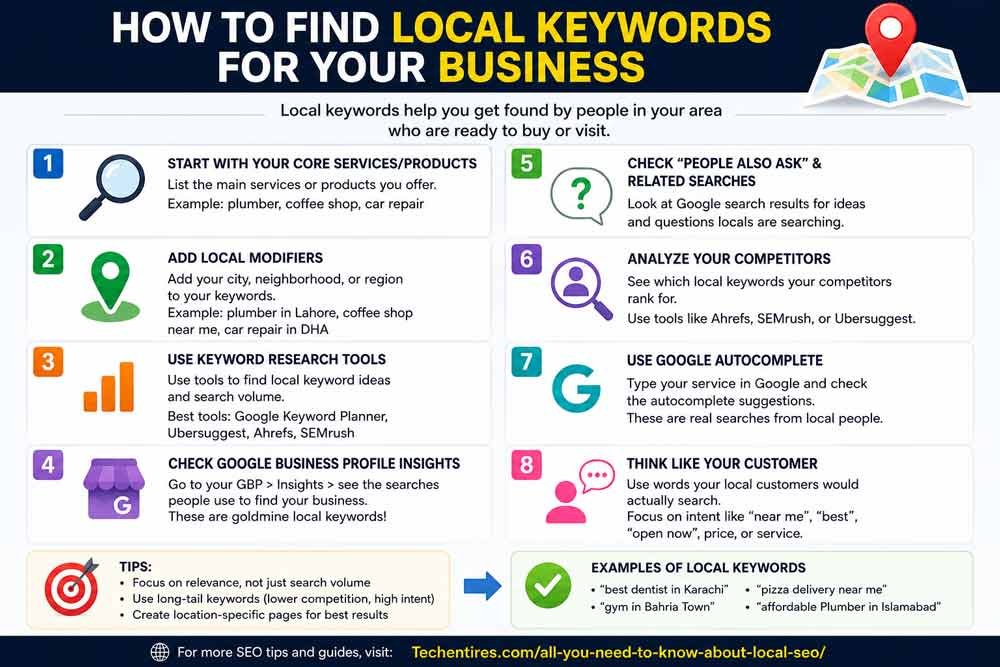
Local SEO for small business starts with local keyword research finding the exact search terms people in your area use to find businesses like yours. This is different from standard keyword research because you are not just looking for high volume you are looking for local intent signals and geographic modifiers.
According to Semrush’s 2026 data cited by Shopify, keyword variations for ‘near me’ have a combined monthly search volume of 7.1 million.
The US alone sees over 200 million ‘near me’ searches per month. These are the highest-converting searches in local SEO because they carry explicit purchase intent the searcher has already decided they want something and is ready to act.
How to find local keywords for your business
- Start with your core services plus location. Combine what you do with where you do it. ‘accountant London’, ‘plumber Liverpool’, ‘coffee shop near Canary Wharf’. These seed keywords define your primary targets.
- Add near me variations. ‘accountant near me’, ‘best plumber near me’ Google resolves these using device location. Optimise for the intent behind them by ensuring your GBP is complete and your website mentions your city and neighbourhood.
- Go neighbourhood-level. Neighbourhood and suburb-level keywords often face less competition and attract users closer to making a decision. ‘pizza delivery Shoreditch’ faces less competition than ‘pizza delivery London’ with higher intent from users in that area.
- Check Google Search Console for accidental local rankings. Filter your Search Console performance by location and look for queries you already receive impressions for but haven’t deliberately targeted. These are local keyword opportunities with existing Google recognition.
- Analyse competitor local keywords. In Ahrefs or SEMrush, enter a local competitor’s domain and filter for keywords with local modifiers. Every local keyword they rank for that you don’t is an opportunity.
On-page local SEO optimising your website for local search
Your Google Business Profile handles local pack visibility, but your website controls local organic ranking the results below the map. On-page signals account for 16% of local pack ranking weight and the majority of local organic position.
Location pages
If you serve multiple locations, create a separate page for each one a dedicated location page SEO approach that targets the specific search terms for that area.
Each location page should include the city name in the page title, H1, meta description, and body content naturally. Include the full address, a Google Maps embed, local phone number, location-specific testimonials or reviews, and content specific to that location’s services or team.
Do not create near-duplicate location pages by simply swapping city names in a template. Google recognises thin location pages and they frequently end up in the ‘Crawled currently not indexed’ list in Search Console. Each location page needs genuinely unique content.
Thin location pages also waste crawl budget see the full explanation.
Schema markup for local businesses
LocalBusiness schema markup is structured data that tells Google exactly what type of business you are, where you are located, your hours, and your contact information.
It reinforces your NAP information in a machine-readable format that directly supports local pack eligibility. Add LocalBusiness schema to your homepage and every location page.
Rank Math and Yoast SEO both include schema markup builders that make this straightforward without coding knowledge see the full plugin guide .
Include location keywords naturally in content
Your service pages and blog content should mention your city, neighbourhood, and service area naturally throughout the text not stuffed, but genuinely woven into context.
Writing a post about ‘signs your boiler needs replacing’ works for generic SEO. ‘Signs your boiler needs replacing in Manchester’ works for local SEO because it attaches the informational content to a geographic area.
These local tactics work best on top of solid fundamentals, run through our on-page SEO checklist to make sure your pages are optimized before layering local signals on top.
Reviews the 16% ranking signal most businesses ignore
Review signals account for 16% of local pack ranking weight and are the primary trust mechanism through which local consumers make purchase decisions.
According to digitalapplied.com’s April 2026 data, 87% of consumers read online reviews for local businesses before making a decision. Businesses with fewer than 10 reviews or an average rating below 4.0 face a measurable conversion penalty regardless of how well optimised their GBP is.
Three things Google measures in your review signals:
- Quantity how many reviews you have. The top-ranking Google Business Profiles average around 250 reviews, according to Localo research cited by Shopify. This takes consistent effort over time there is no shortcut.
- Recency when your reviews were received. A steady flow of new reviews signals an active, operating business. 30 reviews received over 3 years is weaker than 30 reviews received in the past 6 months.
- Response rate whether you respond to reviews, including negative ones. Responding to reviews is a direct local search ranking signal and demonstrates to potential customers that you are engaged and professional.
How to get more Google reviews ethically
- Ask immediately after a positive experience timing matters more than the channel used to ask
- Send a direct link to your GBP review form in follow-up emails, SMS, or receipts
- Add a QR code to your premises pointing directly to your review page
- Respond to every existing review negative responses handled professionally often convert more customers than the original positive reviews
Never buy reviews, create fake reviews, or offer incentives for reviews. Google’s review spam detection has improved significantly in 2026 and violations can result in review removal, profile suspension, or permanent ranking penalties.
Local link building building authority in your area
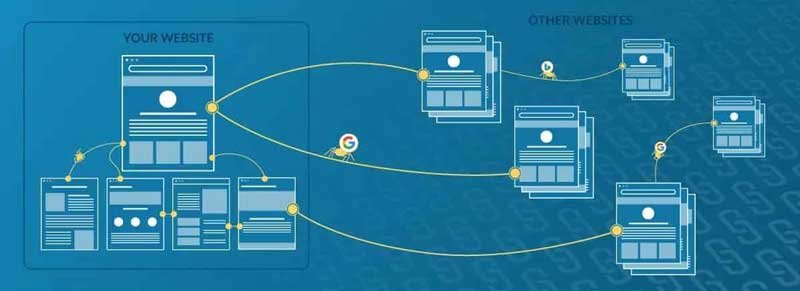
Links from other websites remain one of the most powerful local SEO signals, even at the local level. Businesses in Google’s Local Map Pack have an average of 993 backlinks, according to Semrush data cited by Shopify.
Local link building is the practice of earning links from other websites in your geographic area and industry.
- Local Chamber of Commerce and business associations joining your local Chamber typically includes a directory listing link. These are genuine local authority signals Google recognises and values.
- Local press and news sites a mention and link in your local newspaper’s website or a local news blog is one of the strongest local authority signals available. Sponsor local events, make a charity donation, or offer expert comment on a local issue to earn editorial coverage.
- Local business partnerships complementary local businesses linking to each other from their ‘trusted partners’ or ‘local suppliers’ pages create genuine local authority signals without any outreach to national or international sites.
- Local blog and influencer mentions local lifestyle bloggers and neighbourhood community sites often feature local business recommendations. These earn genuine local citations and links from geographically relevant sources.
For the full backlink strategy framework that applies to local link building as well as general SEO, see our complete guide.
Local SEO and AI Overviews in 2026
AI Overviews now appear for a significant portion of local queries in 2026, particularly for informational local searches ‘best restaurants in [city]’, ‘how to find a plumber near me’, or ‘local SEO tips for small businesses’.
The businesses and sources cited in these AI-generated answers are selected based on the same authority signals that drive traditional local search rankings.
What this means practically: a well-optimised local SEO presence strong GBP, consistent citations, good reviews, and location-specific content also increases the likelihood of being cited or featured in AI-generated local answers.
The same work serves both traditional local pack visibility and emerging AI search visibility simultaneously. See the full guide on AI Overviews and SEO for the complete picture.
“Many of these same AI Overview queries start as spoken questions rather than typed ones, see our full guide on voice search SEO strategies for how to optimize specifically for Alexa, Siri, and Gemini Live.”
Local SEO checklist for beginners 2026
GOOGLE BUSINESS PROFILE
- Claim and verify your GBP at business.google.com
- Choose the most accurate primary category
- Complete every field description (~70 words), hours, services, attributes
- Upload at least 10 high-quality photos
- Enable messaging and respond within 24 hours
- Post at least once per week offers, updates, events
REVIEWS
- Aim for 50+ reviews with a 4.5+ average rating
- Create a direct review link and share it with customers after every positive experience
- Respond to every review positive and negative
WEBSITE AND ON-PAGE SEO
- Add LocalBusiness schema to homepage and all location pages
- Include city/location naturally in page titles, H1s, and first paragraphs
- Create a dedicated location page for each area you serve
- Embed Google Maps on your contact page
CITATIONS AND NAP
- Audit all existing citations using BrightLocal or Moz Local
- Fix all NAP inconsistencies identical format everywhere
- Claim listings on: Google, Bing, Apple Maps, Facebook, Yelp, and your industry directories
LINK BUILDING
- Join your local Chamber of Commerce
- Pursue at least one local press mention or community site link per month
- Partner with complementary local businesses for mutual referral links
Frequently Asked Questions
What is local SEO and why does it matter?
Local SEO is the practice of optimising your online presence to appear in search results when people nearby search for your products or services. It matters because 46% of all Google searches carry local intent approximately 3.9 billion searches per day and 76% of people who perform a local mobile search visit a business within 24 hours.
Businesses in the top three Google Map Pack positions receive 126% more traffic and 93% more calls than those ranked 4 to 10. Local SEO is how your business captures those high-intent, high-conversion searches.
How to rank in Google Maps local pack?
To rank in the Google Maps local pack, focus on the three factors Google uses for local pack rankings: proximity (how close your business is to searchers you cannot change this but can expand your service area), relevance (how accurately your GBP category and content match search queries), and prominence (how well-known and trusted your business appears across the web driven by reviews, citations, backlinks, and GBP completeness).
GBP signals account for 32% of local pack ranking weight, reviews account for 16%, and citation consistency accounts for 7% together these three areas represent 55% of your local pack ranking.
How to optimise Google Business Profile for local SEO?
Complete every field in your GBP choose the most accurate primary category, write a 70-word keyword-aware description, add all services and hours, upload photos regularly, and post at least weekly.
Enable messaging and respond within 24 hours. Build toward 50+ reviews with a 4.5+ rating by sending customers a direct review link after positive experiences. Respond to every review. Profiles with regular posts appear 3.1 times more often in top 3 map results (sqmagazine.co.uk, June 2026).
Why is my business not showing on Google Maps?
The most common reasons a business does not appear in Google Maps are: GBP not claimed or not verified, incorrect business category, incomplete profile, very few or no reviews, NAP inconsistencies between your GBP and website, your business is too far from the searcher’s location, or the business is new and has not yet built enough local authority.
Start by claiming and verifying your GBP, completing every field, fixing your NAP across all directories, and beginning a consistent review-generation process.
What is NAP consistency and why does it matter for local SEO?
NAP stands for Name, Address, Phone number. NAP consistency means these three pieces of information are identical across every platform your business appears on Google, Facebook, Yelp, your website, and every directory.
Even small discrepancies like ‘Street’ vs ‘St’ or an old phone number create conflicting signals that reduce Google’s confidence in your business information and suppress your local rankings. According to biziq.com, 64% of SMBs have NAP inconsistencies in at least one major directory making this one of the most common and most fixable local SEO problems.
How do reviews affect local SEO rankings?
Review signals account for 16% of local pack ranking weight according to Moz’s Local Search Ranking Factors study. Google measures review quantity, average rating, recency, and your response rate.
Listings with 50 or more reviews and a 4.5+ rating have a 61% higher chance of reaching the top local pack position. 87% of consumers read online reviews before visiting a local business in 2026 meaning reviews affect both your search ranking and your conversion rate simultaneously.
Is local SEO different from regular SEO?
Yes. Regular SEO optimises for any searcher anywhere the audience is global or national. Local SEO specifically targets geographic searches, where the searcher’s location is a primary ranking factor.
Regular SEO focuses on content quality, backlinks, and technical site health. Local SEO adds Google Business Profile optimisation, NAP citation consistency, review signals, and proximity to the searcher as additional ranking factors. Both share the same technical foundations fast site, mobile-friendly, structured data but local SEO adds a location layer that requires its own strategy and tools.
